
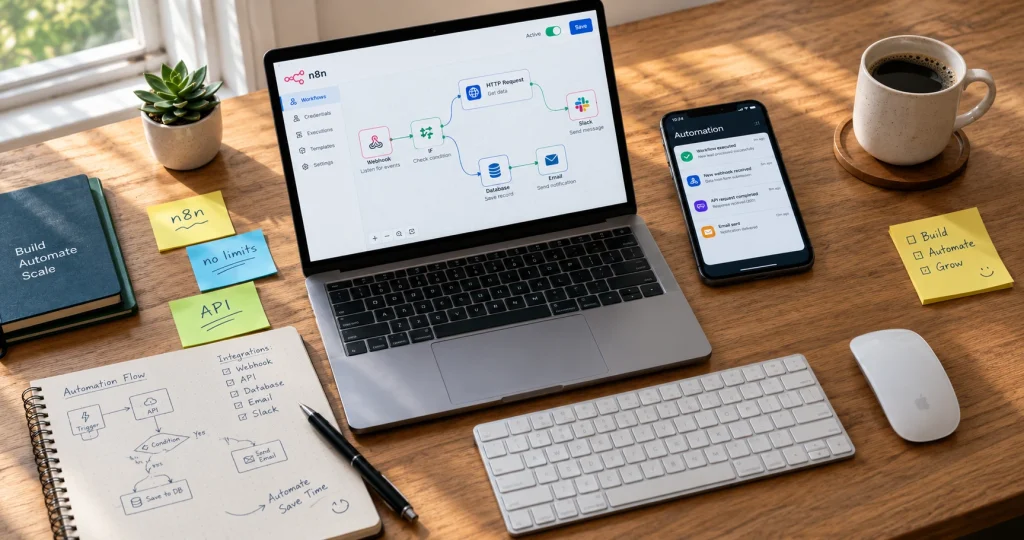
What Does “No Restrictions” Actually Mean in AI Automation?
Most people hear “no restrictions” and assume it means completely unlimited access to everything. That’s not quite right, and honestly, it’s where a lot of confusion starts.
When someone searches for AI automation tools with no restrictions, they’re usually frustrated by one of four specific walls they’ve hit. Sometimes it’s usage caps that stop workflows mid-run. Other times it’s content filters blocking perfectly reasonable prompts. Or it’s pricing tiers locking critical features behind paywalls. And then there’s the data privacy concern—wondering who’s actually reading the information flowing through these platforms.
I’ve tested dozens of these tools, and here’s what I learned: “no restrictions” means different things depending on which wall you’re trying to break through.
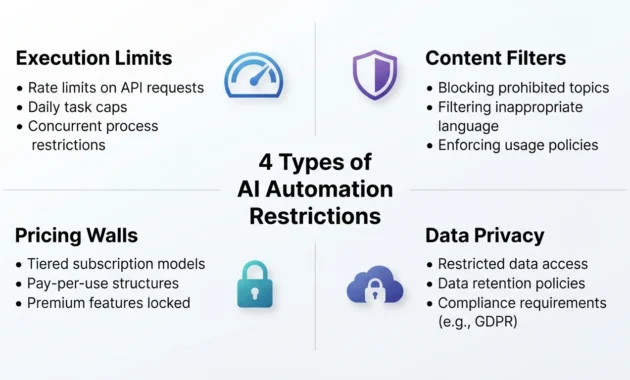
Execution & Workflow Limits
This is the first restriction most people slam into.
You build a perfect automation workflow. It runs beautifully during testing. Then you deploy it, and three days later everything stops. Why? Because you hit your monthly execution cap. Or your task limit. Or the platform decided your workflow counts as “heavy usage” and throttled you without warning.
Free tiers almost always cap you at 100 to 1,000 task executions per month. That sounds like a lot until you realize a single multi-step workflow can burn through 20 tasks in one run. If you’re automating anything daily, you’re done by mid-month.
Paid platforms are sneaky about this too. They advertise “unlimited workflows” but bury the real limit in task executions or compute minutes. I’ve seen tools that let you build infinite workflows but cap you at 10,000 operations monthly, which is nothing if you’re running customer-facing automations.
The truly unrestricted tools here are self-hosted platforms like n8n or Activepieces. If you run them on your own server, there’s no monthly execution counter. No task police. You’re only limited by your hardware, which means you control the ceiling.
Cloud platforms with genuinely unlimited executions exist, but they’re rare and expensive. Most of the time when a platform says “unlimited,” they mean unlimited until you become a problem for their infrastructure. Then the support emails start.
Content & Safety Filters
This is where things get messy.
AI automation tools with built-in language models—especially those using GPT-4 or Claude—come loaded with content filters. Try to automate anything remotely controversial, even if it’s perfectly legal and ethical, and you’ll get blocked. I’ve had workflows fail because the AI flagged the word “targeting” in a marketing automation context. Not because I was doing anything wrong. Because the model’s safety layer got triggered by a false positive.
Unrestricted chatGPT alternatives and uncensored AI models solve this by removing or loosening those guardrails. Tools like NoLimitGPT, local LLM runners with Ollama, or open-source models you host yourself let you process content without arbitrary blocks. If you’re specifically looking for AI automation tools with no restrictions that can handle sensitive or controversial content without constant blocking, exploring platforms designed for unrestricted workflows becomes essential.
But here’s the trade-off: no filter. GPT tools give you complete freedom, which also means complete responsibility. There’s no safety net. If you’re automating content generation or customer interactions, you need to build your own quality checks. The model won’t stop you from generating something factually wrong, offensive, or just plain useless.
Most businesses can’t handle that risk. Which is why truly unfiltered AI is mostly used by developers, researchers, or solo creators who need flexibility and are willing to babysit the output.
If you just need automation without content restrictions but still want some guardrails, look for platforms that let you choose your model. OpenRouter, for example, gives you access to dozens of models with varying filter levels. You pick the one that matches your risk tolerance.
Pricing & Feature Walls
This one drives people crazy.
You sign up for a free plan. The marketing page says, “Start automating today.” Then you realize the free tier doesn’t include webhooks. Or API access. Or the ability to connect more than three apps. Or schedule workflows to run automatically. Basically, everything you actually need to automate anything real is locked behind the paid plan.
I’ve tested tools that advertise themselves as free AI automation platforms, and technically they are. But “free” means you can manually trigger one basic workflow that connects Gmail to Google Sheets. The moment you want it to run on a schedule or connect to anything outside the Google ecosystem, you’re looking at $20 to $50 per month minimum.
The platforms with the fewest pricing restrictions are, again, open-source and self-hosted. N8n’s community edition is fully functional with no feature walls. You get webhooks, scheduling, custom code, API access, everything. The only cost is your server, which you can run for $5 to $10 monthly on any cloud provider.
Cloud-based tools with fair pricing exist, but you have to read the fine print. Make is generous with its free tier compared to Zapier. Activepieces Cloud has a free plan that actually includes useful features. But none of them are truly “no restrictions” because they all cap you somewhere, either in executions, connections, or storage.
If pricing restrictions are your main problem, self-hosting is the only real answer. Everything else is just a question of which paywall you’re willing to hit.
Data & Privacy Restrictions
This is the restriction people forget until it’s too late.
When you run automation workflows through a cloud platform, your data flows through their servers. Every API call, every processed record, every piece of customer information passes through infrastructure you don’t control. For most people, that’s fine. For anyone handling sensitive data, regulated industries, or just anyone who values privacy, that’s a massive restriction.
AI without restrictions in the privacy sense means local processing. Self-hosted automation platforms where the data never leaves your network. Or at minimum, platforms that offer on-premise deployment options for enterprise customers.
Local AI tools like Ollama, AnythingLLM, and LM Studio let you run language models entirely on your own hardware. No data sent to OpenAI. No logs stored in someone else’s database. No tracking. The restriction removed here isn’t a usage cap. It’s the requirement to trust a third party with your information.
Cloud platforms can’t offer this, by definition. Even the ones with strong privacy policies are still processing your data on their infrastructure, which means it’s subject to their terms, their security practices, and their jurisdiction’s laws.
The trade-off is effort. Self-hosted and local setups take time to configure, maintain, and scale. Cloud platforms handle all of that for you, but you pay for that convenience with data access and control.
Most people pick convenience. But if data sovereignty matters to you, or if you’re in healthcare, legal, or finance, the privacy restriction is the one you absolutely have to solve first. And that means going local.
Best No-Code Automation Platforms With No Restrictions
I’ve spent months testing no-code automation platforms, and here’s what most reviews won’t tell you: the “best” tool depends entirely on which restriction you’re trying to escape.
Some platforms give you unlimited executions but lock advanced features behind expensive tiers. Others are completely free and open-source but require technical setup that defeats the “no-code” promise for non-technical users. A few claim to have no limits at all, then quietly throttle your workflows when you actually start using them at scale.
The tools below are the ones I keep coming back to. Not because they’re perfect—none of them are—but because each one solves a specific restriction problem better than anything else I’ve tested.
Make—Best Overall No-Code Automation Platform
Make is what I recommend when someone just wants a solid, reliable no-code automation tool that won’t surprise them with hidden limits.
The free tier gives you 1,000 operations per month, which sounds low until you realize how Make counts operations. One operation equals one module action in a workflow, not an entire workflow run, like some platforms count it. That means you can actually build useful automations without constantly hitting the cap during testing.
What makes Make stand out is the visual builder. It’s genuinely intuitive, not “intuitive for developers pretending to understand how normal people think. ” You drag modules onto a canvas, connect them with lines, and watch your data flow from one step to the next in real time. When something breaks, you can see exactly where it failed and what data was moving through at that point.
I’ve built everything from simple Slack notifications to complex multi-step workflows that pull data from Airtable, process it through OpenAI, format the results, and push them to multiple destinations. All without writing a single line of code.
The restriction that Make removes is better than anyone else’s, which is complexity barriers. Other platforms force you into rigid templates or make you think like a programmer even though they claim to be no-code. Make it actually let you build sophisticated logic—conditional paths, filters, routers, and error handlers—using visual tools that make sense.
The downside is cost at scale. Once you pass 10,000 operations monthly, you’re looking at paid plans starting around $9, and the price climbs fast if you’re running heavy workflows. For businesses doing serious automation, you’ll hit $29 to $99 monthly pretty quickly.
But for most solo users, freelancers, or small teams, Make’s free tier plus occasional paid months gives you more practical freedom than platforms that advertise “unlimited” but cripple you in other ways.
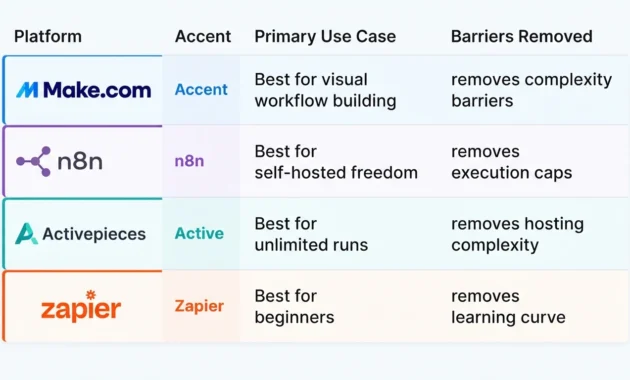
n8n—Best for Visual Workflow Building
If Make is the safe choice, n8n is the power user’s dream.
It’s open-source, which means you can self-host it for free with zero feature restrictions. Every node, every integration, and every advanced feature that n8n offers is available in the community edition. No premium tier. No hidden paywalls. You host it on your own server, and you get the full platform.
The visual workflow builder is where n8n crushes every competitor. It’s cleaner than Make, more flexible than Zapier, and gives you access to things most no-code platforms won’t touch. Custom JavaScript code nodes. Direct database queries. Webhook listeners. SSH connections. You can combine no-code visual building with actual code snippets when you need that extra 10% of control.
I use n8n for anything that needs to run continuously without me worrying about execution caps. Customer data syncs between systems. Automated content pipelines. Monitoring workflows that check APIs every few minutes. With self-hosting, there’s no monthly operation limit to hit. It just runs until you turn it off.
The catch is setup. Calling n8n “no-code” is technically accurate for building workflows, but getting it running in the first place requires some technical comfort. You need to spin up a server, install n8n via Docker or npm, configure environment variables, and handle your own updates and backups.
For non-technical users, that’s a deal-breaker. But if you’re even slightly technical—or willing to follow a detailed tutorial once—you get a truly unrestricted automation platform for the cost of a $5 monthly VPS.
N8n also offers a cloud-hosted version if you want the platform without the setup hassle. But that reintroduces execution limits and pricing tiers, which defeats the main advantage. The cloud version is decent. The self-hosted version is unbeatable.
Activepieces—Best No-Code Platform With Unlimited Runs
Activepieces is the tool I point people toward when they specifically need unlimited workflow executions and don’t want to deal with self-hosting complexity.
It’s open-source like n8n, but it’s designed from the ground up to be easier to deploy. One-click installs on Railway, Render, or DigitalOcean. Simpler configuration. Cleaner onboarding for people who aren’t DevOps engineers. You still need to handle your own hosting, but the technical barrier is noticeably lower.
The workflow builder sits somewhere between Make’s polish and n8n’s power. It’s visual, intuitive, and clean. You won’t get confused trying to connect basic triggers and actions. But it also supports branching logic, loops, custom code steps, and direct HTTP requests for when you need flexibility beyond the built-in integrations.
What makes Activepieces the best choice for unlimited runs is how it handles execution. Because you’re self-hosting, there’s no artificial cap. You can run a workflow once per minute, 24/7, for months straight, and the only limit is your server resources. I’ve had data sync workflows running continuously on Activepieces for weeks without a single timeout or throttle warning.
The integration library is smaller than Make or n8n, which is the main drawback. If you need to connect to niche tools or legacy APIs, you’ll probably end up using webhook nodes and HTTP requests to build custom connections. That’s totally doable, but it’s extra work compared to platforms with 1,000+ pre-built integrations.
For straightforward automation needs—connecting common tools, processing data, triggering actions based on events—Activepieces gives you genuine unlimited execution freedom without the steep learning curve of n8n or the pricing walls of cloud platforms.
And if you really don’t want to self-host, Activepieces offers a cloud version with a fair free tier. It’s capped at 1,000 tasks monthly, which is standard for free tiers, but at least you have the option to move to self-hosted later without rebuilding everything.
Zapier (Free Tier) — Best Budget/Free No-Code Option
I know what you’re thinking. Zapier? The platform famous for expensive pricing and tight free-tier limits?
Yes. Because for someone just starting with automation who has zero technical skills and zero budget, Zapier’s free tier is still the easiest entry point that actually works.
You get 100 tasks per month. That’s absurdly low compared to every other platform I’ve mentioned. But those 100 tasks come with the most beginner-friendly interface in the entire automation space, the largest library of pre-built integrations, and the best documentation and community support for troubleshooting when something breaks.
I’ve watched non-technical people try to use Make, n8n, and Activepieces. They get stuck on concepts like HTTP requests, JSON parsing, and error handling. Then they try Zapier, and within 20 minutes they’ve built a working automation that connects Google Forms to Slack. It just works, and it works in a way that makes sense to people who have never thought about APIs or webhooks before.
The 100-task limit means you can’t run anything at scale. But for personal productivity automations—saving email attachments to Dropbox, logging new Trello cards to a spreadsheet, getting Slack notifications when someone fills out a form—100 tasks get you through the month if you’re strategic about what you automate.
Where Zapier becomes the best budget option is flexibility. You can stay on the free tier for as long as those 100 tasks cover your needs. Then, if you grow into heavier usage, you already know the platform, and upgrading is seamless. Compare that to learning n8n or Activepieces, hitting a technical wall, giving up, and trying something else.
Zapier also has the restriction I care about most for beginners: it removes the fear of breaking something. The interface holds your hand. The error messages actually explain what went wrong. When a step fails, Zapier shows you the exact data that caused the problem and suggests fixes.
That safety net matters when you’re just learning automation. Once you’re comfortable, you’ll outgrow Zapier’s pricing and move to something more cost-effective. But as a starting point that won’t overwhelm or frustrate you, nothing beats it.
For pure budget efficiency, though, Zapier loses to self-hosted options. If you have even basic technical skills, spin up Activepieces or n8n and skip Zapier entirely. But if you’re truly non-technical and just need simple automations to work without a learning curve, those 100 free tasks are worth more than unlimited executions on a platform you’ll never figure out.
n8n Alternatives & Competitors With Fewer Restrictions
N8n is the go-to recommendation for unrestricted automation, and for good reason. But it’s not always the right choice.
I’ve run into situations where n8n’s learning curve killed a project before it started. Or where the integration I needed didn’t exist and building a custom HTTP node turned a simple automation into a two-day research project. Or where the person asking for help heard “self-hosted” and immediately checked out because they had zero interest in managing a server.
That’s when n8n alternatives matter. Not because n8n is bad—it’s excellent—but because different tools remove different restrictions, and sometimes the restriction you’re fighting isn’t execution limits or pricing. Sometimes it’s complexity, setup friction, or missing features.
How n8n’s Free/Self-Hosted Tier Compares
N8n’s community edition is completely free when you self-host it, and that’s its biggest strength. You get every feature. Every node. Every integration. Unlimited workflow executions. No nag screens, no premium upsells, no features locked behind a paywall.
Compare that to most automation platforms, where “free” means you can build one workflow that runs 100 times per month and connects to three apps. N8n doesn’t play that game. If you can set up a server and install the software, you get the full platform with zero recurring costs.
The self-hosted tier runs on any VPS or cloud instance. I’ve run n8n on a $5 DigitalOcean droplet, a $4 Hetzner VPS, and even a Raspberry Pi sitting in my closet. As long as you have Node.js and a way to keep the process running, n8n works.
But here’s where the comparison gets tricky. “Free” doesn’t mean zero cost. You’re paying with time and effort instead of money.
Setting up n8n requires comfort with command-line interfaces, environment variables, and basic server management. You need to handle SSL certificates if you want secure webhook endpoints. You’re responsible for backups, updates, and troubleshooting when something breaks. If your server goes down, your automations stop until you fix it.
N8n’s cloud-hosted version removes all of that overhead, but it reintroduces restrictions. The free cloud tier caps you at 5,000 workflow executions per month, which sounds generous until you’re running anything that polls APIs regularly or processes high-volume data. Paid cloud plans start at $20 monthly and climb fast.
So when people compare n8n alternatives, they’re usually comparing against one of two versions: the completely unrestricted but technically demanding self-hosted option or the easier but limited cloud-hosted version.
Most alternatives make a different trade-off. They’re easier to set up than self-hosted n8n but more flexible than n8n Cloud. Or they’re harder to set up but give you capabilities N8N doesn’t have. Or they’re simpler and cheaper but only work for specific use cases.
The question isn’t whether n8n is good. It’s whether the specific restrictions N8N removes are the ones actually blocking you.
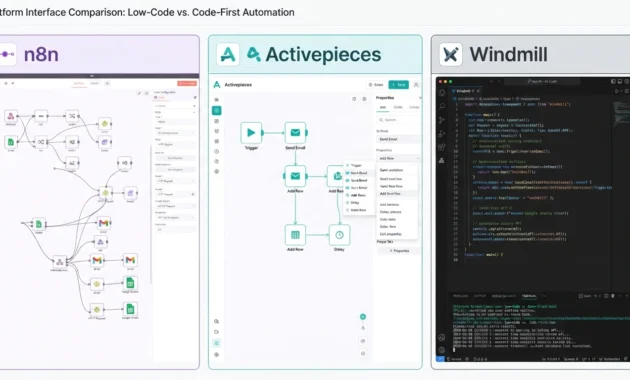
Top 5 n8n Competitors for Unrestricted Automation
These are the tools I actually use when n8n doesn’t fit the job.
Active pieces
This is the closest thing to “n8n but easier” that exists right now.
Activepieces is open-source, self-hosted, and gives you unlimited executions with no feature walls. The setup process is simpler than n8n. One-click deployments on Railway, Render, and DigitalOcean actually work without troubleshooting. The documentation assumes you’re not a DevOps expert.
The workflow builder feels lighter than n8n’s interface. Fewer options, cleaner layout, less intimidating for people who aren’t deeply technical. You lose some advanced capabilities—n8n’s expression editor is more powerful, and the node library is bigger—but for 90% of automation tasks, Activepieces has everything you need.
I switched a client from n8n to Activepieces because their team kept breaking things in n8n’s interface and couldn’t figure out how to fix them. Activepieces’ simpler design meant fewer ways to create confusing workflow logic. Their automations became more maintainable, even though the platform was technically less powerful.
If you like the idea of n8n but want less complexity and an easier hosting experience, Activepieces is the move.
Windmill
Windmill is what you choose when n8n isn’t technical enough.
It’s open-source and self-hosted like n8n, but it’s built for developers who want to mix visual workflows with actual code. Every step in a Windmill workflow can be a TypeScript, Python, or Go script. You can import npm packages, call external APIs directly, process data with full programming logic, and still connect everything visually.
N8n has code nodes, but they’re treated as an escape hatch. Windmill treats code as a first-class feature. You’re not fighting the platform when you need to do something custom. You’re using it exactly as designed.
The restriction Windmill removes is the “no-code ceiling.” With n8n, you eventually hit a point where the visual interface can’t express the logic you need, and you start hacking together workarounds using HTTP nodes and JSON parsing. With Windmill, you just write the logic in 20 lines of Python and move on.
The downside is that Windmill assumes you’re comfortable writing code. If you’re not, the platform will frustrate you. But if you are, and if you’re tired of fighting no-code tools that break down the moment you need real conditional logic or data transformation, Windmill is legitimately freeing.
I use it for workflows that involve complex data processing, API orchestration, or anything where I know I’ll need custom scripts. For simple integrations, it’s overkill. For anything algorithmic, it’s perfect.
Huginn
Huginn is the weird, powerful, underappreciated option that almost no one talks about.
It’s open-source, self-hosted, and completely free. It’s been around longer than n8n or most modern automation platforms, which means it’s stable, battle-tested, and a little rough around the edges.
The interface looks like it was built in 2014, because it was. But underneath that dated UI is one of the most flexible automation engines I’ve ever used. Huginn doesn’t limit you to pre-built integrations. Everything is agent-based. You create agents that watch for events, scrape websites, process data, trigger actions, and communicate with each other.
Need to monitor a website for changes and send a formatted alert? Build a website agent, pipe it to a digest agent, and connect that to an email agent. Need to process RSS feeds, filter by keyword, and post matches to Slack? Huginn does that in five minutes.
The restriction Huginn removes is dependency on pre-built integrations. N8n has hundreds of nodes, but if the service you need isn’t supported, you’re building custom HTTP requests and parsing responses manually. Huginn assumes you’ll be doing that from the start, and it gives you the tools to make it straightforward.
The cost is user experience. Huginn’s documentation is dense and assumes technical comfort. The interface is functional but not intuitive. You’ll spend more time learning how agents work and less time clicking through friendly wizards.
I keep a Huginn instance running for web scraping, RSS monitoring, and niche automations that don’t fit cleanly into n8n’s workflow model. It’s not my daily driver, but for specific use cases, nothing else comes close.
Automatically
Automatisch is the “What if we made n8n but with a better UI?” project.
It’s open-source, self-hosted, and explicitly designed as an n8n alternative with a focus on user experience. The workflow builder is cleaner. The app integration setup is more straightforward. The whole platform feels like someone took n8n’s core ideas and sanded down the rough edges.
The integration library is smaller—Automatisch is younger and has fewer contributors—but the ones that exist are well-implemented. If the services you need are supported, the experience of connecting them is smoother than n8n.
The restriction Automatisch removes is friction. N8n’s interface can feel cluttered and overwhelming, especially when you’re building complex multi-branch workflows. Automatisch gives you more breathing room visually, which makes it easier to understand what a workflow is doing at a glance.
I’ve recommended Automatisch to people who tried n8n, felt lost, and wanted something structurally similar but less dense. It’s a smaller project with a less mature ecosystem, but if the simplicity clicks for you, it’s a genuinely pleasant tool to use.
Pipedream
Pipedream is the cloud-based alternative that feels like cheating.
It’s not self-hosted, which immediately disqualifies it for true “no restrictions” status. But it removes so many other restrictions that it’s worth including.
The free tier gives you 10,000 invocations per month and 100 connected accounts. That’s 10x to 100x more generous than most cloud automation platforms. You get access to thousands of pre-built integrations, a huge library of community workflows, and the ability to write custom Node.js code in any step.
The workflow builder is half visual interface, half code editor. You can click through pre-built actions for common tasks, or you can drop into a code step and write exactly what you need. It’s the best hybrid approach I’ve found for people who are technical but don’t want to write everything from scratch.
Pipedream’s logs and debugging tools are miles ahead of self-hosted platforms. Every workflow execution is recorded. You can inspect the exact data that flowed through each step. When something fails, you get a detailed error trace that actually helps you fix the problem.
The restriction Pipedream removes is operational overhead. You don’t manage servers, handle updates, or worry about uptime. You build workflows, and they run reliably. For solo developers and small teams, that trade-off—giving up self-hosting in exchange for zero maintenance—is often worth it.
I use Pipedream for client work where I need fast turnaround and can’t afford to spend time debugging self-hosted infrastructure. The execution limits are high enough that I rarely hit them, and when I do, the paid tier is reasonable.
When to Choose an n8n Alternative Instead
N8n is the default recommendation for unrestricted automation, but it’s not always the right call. Here’s when to pick something else.
Choose Activepieces if you want the self-hosted freedom of n8n but can’t deal with the setup complexity. If the words “Docker,” “environment variables,” and “reverse proxy” make you nervous, Activepieces gets you 80% of n8n’s capability with 50% of the technical overhead.
Choose Windmill if you need to write actual code as part of your workflows and don’t want to fight a visual interface that’s trying to hide the code from you. If you’re building data pipelines, API orchestration, or anything algorithmic, Windmill treats you like a developer instead of trying to protect you from being one.
Choose Huginn if the service you need to automate doesn’t have an API or pre-built integration. If you’re scraping websites, monitoring obscure data sources, or building automations that don’t fit standard app-to-app patterns, Huginn’s agent model handles that better than any workflow builder.
Choose Automatisch if you tried n8n and bounced off the interface. If the visual clutter and density of options in n8n’s UI felt overwhelming, Automatisch gives you the same core functionality in a cleaner, less intimidating package.
Choose Pipedream if you’re technical, need generous free-tier limits, and value operational simplicity over self-hosting. If you don’t want to manage infrastructure and you’re okay with cloud execution, Pipedream gives you more power and flexibility than any other cloud automation platform.
And stick with n8n if you need maximum control and unlimited executions and you’re comfortable managing your own hosting. It’s still the most powerful open-source automation platform with the largest community and the richest integration ecosystem.
The best tool isn’t the one with the most features. It’s the one that removes the specific restrictions blocking you right now.
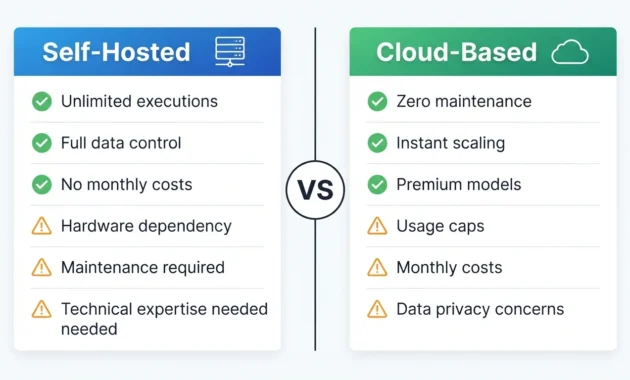
Self-Hosted vs Cloud: Which Gives You Truly Unrestricted AI Automation?
The honest answer is neither option gives you complete freedom. Both come with restrictions. They’re just different restrictions.
I’ve run both setups for months—fully local AI stacks on my own hardware and cloud-based automation using third-party APIs. The question isn’t which one is actually unrestricted, because that’s marketing talk. The real question is which set of trade-offs you can live with.
Self-hosted tools give you complete control over your data and zero usage caps, but you’re restricted by hardware limitations and technical complexity. Cloud tools remove infrastructure headaches and scale effortlessly, but you’re restricted by pricing, rate limits, and the fact that someone else controls the platform you’re building on.
Most people pick based on which restriction scares them more. If you’re terrified of usage caps and monthly bills, you go self-hosted. If you’re terrified of server management and uptime responsibility, you go cloud.
But there’s a middle path that almost nobody talks about, and I’ll get to that at the end.
Self-Hosted/Open-Source Tools (Ollama, AnythingLLM, Local Runners)
Running AI automation completely locally means installing everything on your own hardware and never sending data to external servers.
Ollama is the easiest entry point. It’s a local AI model runner that handles all the complexity of downloading, loading, and running large language models on your own machine. You install Ollama, pull a model like Llama 3 or Mistral, and suddenly you have an unlimited AI chatbot running entirely offline.
No API keys. No rate limits. No monthly costs. No tracking.
The models run directly on your CPU or GPU, which means response speed depends entirely on your hardware. On a decent M1 MacBook or a desktop with a good graphics card, you get responses in seconds. On an older laptop with no GPU, you’ll wait 30 seconds or more per response, which makes real-time automation basically impossible.
AnythingLLM takes this further by giving you a full interface for chatting with local models, connecting them to documents, and building custom AI assistants. You can point it at a folder of files, and it’ll index everything locally so you can ask questions about your own data without that data ever leaving your machine.
I use AnythingLLM for client work involving sensitive information. Legal documents, financial data, healthcare records—anything where sending the content to OpenAI or Anthropic creates compliance or privacy problems. The AI runs on my hardware, the data stays on my network, and there’s no third party in the middle logging prompts.
The restriction this removes is data exposure. You’re not trusting OpenAI’s privacy policy or hoping Anthropic doesn’t train on your data. You’re processing everything locally. For certain industries and use cases, that’s the only acceptable option.
Local AI automation works by combining these tools with workflow platforms like n8n or Windmill. You set up a workflow that triggers on an event, sends data to your local Ollama instance via API, processes the response, and pushes the result somewhere else. All of it runs on infrastructure you control.
But here’s what the “unlimited local AI” marketing doesn’t tell you: hardware becomes your bottleneck immediately.
Running large language models requires significant RAM and ideally a GPU with high VRAM. A 7B parameter model needs around 8GB of RAM minimum. A 13B model wants 16GB. A 70B model needs 64GB or more, plus a serious GPU if you want reasonable response times.
If you’re serious about running local AI models for automation, understanding GPU memory requirements becomes critical. The official Ollama documentation provides detailed system requirements and model compatibility charts that help you match hardware capabilities with the models you plan to run, preventing costly hardware purchases that still won’t deliver the performance you need.
For simple chatbot interactions, this is manageable. For automation workflows that need to process dozens or hundreds of requests, your local machine will choke unless you’ve invested in server-grade hardware. And if you’re spending $2,000 on a GPU to run AI models locally, the “free and unlimited” argument starts to weaken.
The other hidden restriction is model quality. Local models have gotten dramatically better in the last year, but they’re still behind GPT-4 and Claude for complex reasoning, nuanced writing, and following intricate instructions. If your automation depends on high-quality output, you’ll spend a lot of time tweaking prompts and adjusting models to get results that cloud APIs deliver consistently on the first try.
I run local AI for privacy-sensitive work and for workflows where response quality can be slightly lower in exchange for complete control. For everything else, I use cloud APIs because the output quality and speed make the work actually get done instead of turning into a tuning project.
Cloud-Based “Unrestricted” Tools (OpenRouter, API Routers)
Cloud-based unrestricted AI tools give you access to powerful models without running anything yourself. But “unrestricted” here means something very specific and kind of misleading.
OpenRouter is the best example. It’s an API aggregator that gives you access to dozens of AI models through a single interface. GPT-4, Claude, Llama, Mistral, uncensored models, niche models, everything. You pay per token, and you can switch between models in the same workflow depending on what each task needs.
The restriction OpenRouter removes is vendor lock-in and content filtering variability. If you’re using OpenAI directly and hit a content filter block, you’re stuck. With OpenRouter, you just switch to a different model that has looser guardrails. If one API goes down, you route to another. If a model gets too expensive, you switch to a cheaper alternative mid-project.
This is unrestricted in the sense that you’re not trapped by one provider’s rules, pricing, or availability. But you’re still restricted by rate limits, token costs, and the fact that you’re ultimately dependent on someone else’s infrastructure.
I use OpenRouter for production automation where I need reliability and quality but want flexibility in model choice. The ability to route requests to different models based on task complexity—using a cheap, fast model for simple tasks and an expensive, smart model for complex ones—saves money and improves results compared to using one model for everything.
Other cloud API routers like Portkey and LiteLLM offer similar capabilities. They add features like caching, fallback routing, and usage analytics that make automation more robust. You’re still paying per request, but you’re getting infrastructure benefits that would take weeks to build yourself.
The trade-off is cost predictability. With local AI, your costs are fixed—hardware, electricity, and time. With cloud APIs, your costs scale with usage. If your automation suddenly starts processing 10x more requests, your bill goes up 10x. That’s fine when you’re in control of the volume. It’s a nightmare when something breaks and a workflow loops infinitely, racking up thousands of API calls before you notice.
I’ve seen people burn through $500 in a weekend because a buggy automation kept retrying failed requests and they didn’t set up rate limiting. Cloud platforms will happily charge you for your mistakes. Local setups just slow down or crash.
Cloud tools also don’t solve content filtering unless you deliberately choose uncensored models. Most major APIs—OpenAI, Anthropic, and Google—have strict content policies. If you’re automating anything they consider risky, you’ll get blocked. OpenRouter gives you access to models with fewer restrictions, but you’re still subject to OpenRouter’s terms of service. True content freedom only comes from local models you control completely.
The restriction cloud tools remove best is operational complexity. You don’t manage servers, handle model updates, optimize inference speed, or debug GPU drivers. You make an API call, get a response, and move on. For most people, that’s worth the cost and the dependency.
Pros, Cons & Hidden Trade-Offs of Each
Let me break down what the marketing pages won’t tell you.
Self-hosted AI looks completely unrestricted on paper. Unlimited requests, no usage caps, full data control, no tracking. But the hidden restrictions are brutal.
You’re restricted by hardware. If you don’t have a good GPU, response times will make real-time automation painful. If you don’t have enough RAM, you can’t run capable models. You can throw money at this problem, but then “free and unlimited” turns into a $3,000 hardware investment.
You’re restricted by maintenance burden. Models need updates. Dependencies break. Ollama releases new versions. Your server needs monitoring. When something stops working at 2 AM, there’s no support team to call. It’s on you to fix it.
You’re restricted by model availability and quality. The best models—GPT-4 and Claude 3.5—aren’t available for local hosting. You’re limited to open-source models, which are improving fast but still lag behind frontier models for complex tasks. If your automation needs top-tier reasoning or writing quality, local models will frustrate you.
And you’re restricted by isolation. Local AI means your automations only work where your server is. You can’t easily share workflows with teammates, scale across regions, or hand off infrastructure to someone else. Everything is tied to your specific hardware setup.
Cloud-based AI removes all of those restrictions. You get the best models, instant scaling, zero maintenance, and global availability. But you pay for it in other ways.
You’re restricted by cost. Every request costs money. High-volume automation gets expensive fast. And pricing can change—API providers raise rates, change models, or sunset services. You’re building on someone else’s economic decisions.
You’re restricted by rate limits. Even paid APIs throttle you if you make too many requests too quickly. If your automation needs burst capacity, you’ll hit walls unless you’re on enterprise plans.
You’re restricted by data privacy. Your prompts and responses flow through third-party servers. For personal projects, that’s fine. For sensitive business data, it’s a compliance problem. Some providers claim they don’t train on your data, but you’re trusting their policy, not controlling the infrastructure.
And you’re restricted by platform dependency. If OpenAI changes their content policy, your automation breaks. If Anthropic deprecates a model, you scramble to migrate. If your API key gets flagged or suspended, your workflows stop until you resolve it. You’re always one policy change or account issue away from downtime.
The hidden trade-off nobody talks about is the hybrid approach. Run lightweight local models for simple tasks, high-volume processing, and privacy-sensitive work. Route complex tasks and quality-critical work to cloud APIs. Use the right tool for each job instead of forcing one approach to do everything.
I run Ollama locally for data preprocessing, content categorization, and anything touching sensitive information. Then I route final outputs through Claude or GPT-4 for polish and quality. The local model handles bulk work cheaply. The cloud API handles the hard stuff reliably.
This hybrid setup costs more than pure local and requires more complexity than pure cloud. But it removes restrictions from both sides. I get unlimited processing for routine tasks and top-tier quality when it matters, without exposing sensitive data or paying for every single API call.
Most people don’t consider this because guides frame it as self-hosted versus cloud; pick one. But the actual unrestricted approach is using both strategically and letting each one handle what it’s best at.
Are There Any Free AI Automation Tools With No Restrictions?
Short answer: No, not really.
Long answer: It depends on what you mean by “free” and what restrictions you’re willing to accept.
I’ve tested every tool that claims to be a free AI automation platform with no restrictions, and every single one has a catch. Some cap your executions. Some limit which features you can use. Some are genuinely free but require technical skills that effectively restrict who can use them. And some are free today but designed to upsell you the moment you need anything real.
The tools that come closest to being truly free and unrestricted are open-source platforms you self-host. But even those aren’t restriction-free—you’re just trading monthly subscription fees for server costs, setup time, and ongoing maintenance.
Let me walk through what “free” actually means in practice, because the marketing and the reality are very different things.
What “Free” Really Means (Execution Caps, Watermarks, Rate Limits)
When an AI automation tool advertises itself as free, you need to read the fine print immediately.
Most free tiers aren’t designed for you to actually use the platform. They’re designed to let you test it just enough to realize you need the paid version.
Execution caps are the most common restriction. Zapier gives you 100 tasks per month on the free tier. Make gives you 1,000 operations. Pipedream gives you 10,000 invocations, which sounds generous until you realize a single multi-step workflow with a daily schedule burns through that in weeks.
These caps aren’t arbitrary. They’re calibrated to let you build one or two simple automations that prove the platform works, then stop you right when you want to scale. You’ll hit the limit, get frustrated, and either pay for the upgrade or leave.
I’ve watched this happen to clients over and over. They build a workflow on a free tier; it works perfectly. They start relying on it, and by day 15 of the month, they’re locked out because they hit their execution cap. Then they’re stuck paying $20 monthly for something they thought would stay free.
Feature walls are sneakier. The platform is technically free, but anything useful is locked behind the paid tier.
Free plans often exclude webhooks, which means your automations can’t be triggered by external events—they have to run on a manual schedule or be triggered by you clicking a button. They exclude premium integrations, so you can connect to Google Sheets but not Airtable. They exclude multi-step workflows, so you’re limited to simple two-app connections.
The worst offenders advertise “unlimited workflows” on the free tier, which sounds great until you realize workflows are useless without executions, and those are capped at 100 per month. It’s technically true and completely misleading at the same time.
Rate limits hit you even on paid plans sometimes, but they’re brutal on free tiers. You can make one API call per second, or 100 calls per hour, or some other limit that makes real-time automation impossible.
I tried running a customer notification workflow on a free-tier platform, and it rate-limited me so aggressively that notifications were delayed by 5 to 10 minutes. Technically the automation worked. Practically it was useless.
Watermarks and branding show up on tools that are free but monetize through visibility. Your automated emails include “Powered by [Platform]” footers. Your generated content has attribution links. Your workflow outputs are branded.
For personal use, fine. For client work or professional automation, you can’t ship something with someone else’s branding stamped on it. Which means the free tier isn’t actually free for the use case you need.
Data limits cap how much information you can process or store. Free tiers often restrict file sizes, database rows, or the number of records you can sync. If your automation involves processing customer lists, scraping data, or syncing large datasets, you’ll hit these walls fast.
And the nastiest restriction: support access. Free users don’t get support. When something breaks, you’re on your own with documentation and community forums. If the platform has a bug that stops your workflow, you wait until they fix it for paying customers first.
What “free” really means is you get enough access to see how the tool works, but not enough to rely on it. It’s a trial period disguised as a free tier.
Genuinely Free & Open-Source Picks
The only tools that are actually free with no mandatory restrictions are open-source platforms you self-host.
The N8n community edition is completely free. Every feature, every integration, every capability is available with no execution caps or feature walls. You download it, install it on your own server, and use it forever without paying the n8n team anything.
The catch is hosting costs and technical setup. You need a server, which costs $5 to $20 monthly depending on where you host and how much compute you need. You need to install n8n via Docker or npm, configure it, handle SSL certificates, and manage updates. For non-technical users, that’s a restriction that’s just as blocking as a paywall.
But if you’re comfortable with basic server management, n8n gives you genuinely unrestricted automation. I’ve run workflows on n8n for months with tens of thousands of executions, zero downtime, and zero additional cost beyond the $5 monthly VPS bill.
Activepieces is the same model. Open-source, self-hosted, completely free. It’s easier to set up than n8n, which makes it more accessible to people who aren’t DevOps experts, but you still need to handle your own hosting.
I recommend Activepieces to people who want n8n’s freedom but find n8n’s interface and setup process intimidating. You lose some advanced features and integrations, but you gain simplicity and a lower barrier to entry.
Huginn is older, uglier, and more powerful than both. It’s completely free, open-source, and designed for people comfortable with technical concepts. The learning curve is steep, but once you understand how agents work, you can automate things that other platforms can’t touch.
I use Huginn for web scraping, RSS monitoring, and niche automations that don’t fit standard workflow models. It’s not my daily driver because the UI feels ancient, but for specific use cases, it’s irreplaceable and completely free.
Ollama for local AI is free and gives you unlimited AI model access with no API costs, no tracking, and no rate limits. You download models like Llama, Mistral, or Phi, run them on your own hardware, and make unlimited requests.
The restriction is hardware. You need enough RAM and ideally a GPU to run models at usable speeds. A cheap laptop won’t cut it for real automation. But if you have decent hardware, Ollama gives you genuinely free unlimited AI that costs nothing beyond electricity.
Combine Ollama with n8n or Activepieces, and you have a completely free AI automation stack. I run this setup for client projects involving sensitive data where sending information to OpenAI or Anthropic isn’t acceptable. Zero monthly costs, zero data exposure, unlimited executions.
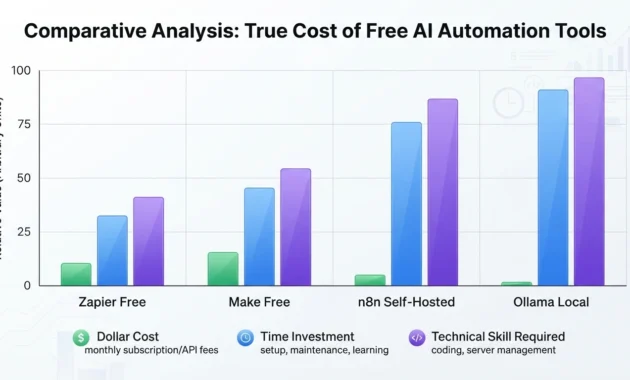
The trade-off is time and skill. These tools are free because you’re doing the work the paid platforms do for you—hosting, maintenance, troubleshooting, and updates. If your time is worth more than the monthly cost of a cloud platform, “free” becomes expensive fast.
But if you’re technical, have time to invest in setup, and want actual unrestricted automation, open-source self-hosted tools are the only real answer.
Free Tools That Still Have Hidden Restrictions
These are the tools marketed as free AI automation platforms that look unrestricted until you actually try to use them.
Zapier’s free tier gives you 100 tasks per month, which disappears in days if you’re automating anything real. Single-step zaps only, so you can’t build complex workflows. No premium apps, which excludes half the tools most people want to connect.
It’s free in the sense that you don’t pay money. But it’s restricted in every way that matters for actual automation. I only recommend Zapier’s free tier for people who want to test one specific integration before committing to a paid plan.
Make’s free tier is more generous with 1,000 operations monthly, but operations burn fast in multi-step workflows. The free tier also caps you at 15-minute intervals for scheduled automations, which means anything time-sensitive is out.
Make is better than Zapier for free usage, but you’re still hitting walls within weeks if you’re doing anything beyond simple personal productivity automations.
Integromat (now Make) used to have one of the best free tiers in the industry. Then they rebranded, restructured pricing, and gutted the free plan. A lot of guides still recommend it based on old information, but the current free tier is much more limited.
IFTTT markets itself as simple free automation, and it is. Too simple. You get basic if-this-then-that connections with no conditional logic, no multi-step workflows, and no data transformation. It works for turning on smart lights when you get home. It’s useless for business automation.
The free tier also limits you to three applets, which means three active automations total. That’s not a free platform. That’s a demo.
Pipedream’s free tier is actually one of the most generous cloud options. 10,000 invocations monthly and 100 connected accounts give you real room to build and test. But it’s still capped, and once you cross that line, you’re on a paid plan.
Pipedream is the best free cloud option if you’re not willing to self-host, but it’s still restricted. Just less restricted than competitors.
AI platforms claiming “unlimited free access” are almost always lying or using a definition of “unlimited” that doesn’t match reality. They’ll give you unlimited requests but cap response length. Or unlimited API calls but rate-limit you to one per minute. Or unlimited access to a weak model but charge for anything useful.
I tested a tool that advertised unlimited free AI chatbot access. Turned out “unlimited” meant unlimited requests to a 3B parameter model that gave barely coherent responses. The capable models required a paid subscription. Technically unlimited. Practically useless.
Browser extensions and plugins that claim free AI automation usually inject ads, collect your data, or restrict you to their specific ecosystem. You get free access in exchange for privacy, which is a restriction most people don’t realize they’re accepting.
The rule is simple: if a cloud platform is offering something for free with no obvious restrictions, look harder. The restrictions are there. They’re just hidden in the fine print, buried in feature comparison charts, or disguised as “fair use” policies that kick in the moment you actually use the platform seriously.
Genuinely free and unrestricted tools exist. But they’re all open-source, self-hosted, and require you to bring your own infrastructure and technical skills. Everything else is either a limited trial pretending to be a free tier or a free tier designed to convert you to paid the moment you need anything real.
Unfiltered & Uncensored AI Chatbots That Pair Well With Automation
This is the section most automation guides won’t touch because it’s messy, controversial, and easy to misunderstand.
But the search volume is massive, which means real people are looking for this. And most of them aren’t looking for anything unethical or illegal—they’re just tired of AI models refusing to process legitimate requests because of overly aggressive content filters.
I’ve had ChatGPT block me for asking it to write marketing copy about dating apps. Claude has refused to help with fictional violence in creative writing projects. Google’s AI won’t touch anything remotely political, even in neutral analytical contexts. These filters exist for good reasons, but they’re calibrated so conservatively that they block tons of harmless use cases.
That’s where uncensored AI chatbots come in. Not because you want to do something harmful. Because you want to automate tasks without an AI model second-guessing every prompt and refusing to process content that’s perfectly legal and acceptable.
But—and this is critical—using unfiltered AI in automation comes with real risks that don’t exist with filtered models. You need to understand those trade-offs before you connect an uncensored LLM to a workflow that runs automatically.
Best Uncensored AI Chatbots for Automation Workflows
Let me be clear about what “uncensored” means here. These models don’t have built-in content filters that refuse requests based on topic, tone, or subject matter. They’ll process whatever you ask without blocking you.
That doesn’t mean they’re designed for harmful content. It means they trust you to use them responsibly instead of treating you like a child who needs constant supervision.
Local models through Ollama are the most unrestricted option. You download open-source models like Dolphin, Nous Hermes, or WizardLM Uncensored, run them locally via Ollama, and you have complete control.
These models have no content filters at all. They’ll respond to anything. For automation, that means you can process user-generated content, handle controversial topics, write edgy marketing copy, or analyze sensitive data without hitting arbitrary blocks.
I use local uncensored models for client workflows involving content moderation, sentiment analysis on politically charged social media posts, and creative writing automation where filtered models constantly refuse to generate certain story elements. The models just work without fighting me.
The downside is quality. Local models are improving fast, but they’re still behind GPT-4 and Claude for complex reasoning, nuanced tone, and following detailed instructions. If your automation needs high-quality output, you’ll trade content freedom for lower reliability.
OpenRouter with uncensored model selection gives you cloud-based access to unfiltered models without running them yourself. You can route requests to models like Dolphin Mixtral, Nous Hermes, or other uncensored variants through a single API.
This is the middle ground between local control and cloud convenience. You get uncensored output without managing local infrastructure. You pay per token like any API, but you’re not restricted by OpenAI or Anthropic’s content policies.
I route automation requests through OpenRouter when I need uncensored processing but local models aren’t fast or capable enough. Customer support automation that needs to handle complaints with profanity, content analysis for moderation systems, or anything where filtered APIs would choke.
Poe with model selection lets you access multiple AI models, including some with looser content restrictions, through a simple interface. It’s not truly uncensored—Poe still has platform-level policies—but it’s more permissive than ChatGPT or Claude directly.
Poe works for automation via their API, though the pricing and rate limits are less flexible than OpenRouter. I’ve used it for prototyping workflows that would get blocked on mainstream platforms, then migrated to local models for production.
Self-hosted models via Text Generation WebUI or LM Studio give you the same freedom as Ollama but with more control over inference settings, prompt formatting, and model configuration. If you need to fine-tune how an uncensored model responds, these interfaces give you every knob and setting.
The trade-off is complexity. Ollama is plug-and-play. Text Generation WebUI and LM Studio require more setup and understanding of how language models work. For automation, that extra control matters when you’re trying to get consistent output from an uncensored model that has no guardrails.
Janitor AI and similar uncensored chatbot platforms exist, but most aren’t designed for automation. They’re built for conversational use, often with a focus on roleplay or creative content that filtered models won’t touch. Some have APIs, but they’re inconsistent, rate-limited, and not reliable enough for production workflows.
I’ve tested a few for automation and abandoned them quickly. If you need an uncensored model for automation, local hosting or OpenRouter are the only serious options.
How to Connect an Unfiltered LLM to Your Automation Stack
Connecting an uncensored AI chatbot to your automation workflow is technically straightforward, but you need to build in safeguards that filtered APIs provide automatically.
For local models via Ollama, the connection is an HTTP API call. Ollama runs a local server on your machine, usually at localhost:11434. Your automation platform—n8n, Activepieces, Pipedream, whatever—makes a POST request to that endpoint with your prompt, and Ollama returns the model’s response.
In n8n, you’d use an HTTP Request node pointing to your Ollama instance. In Pipedream, you’d write a Node.js step that calls the Ollama API. It’s the same pattern as calling OpenAI’s API, just pointed at your local server instead of a cloud endpoint.
The trick is handling model response variability. Uncensored models are less consistent than GPT-4. They’ll sometimes give you perfect output and sometimes go off-topic or misinterpret prompts. You need to build validation into your workflow—check the response format, verify it contains expected elements, and have fallback logic for when the model produces garbage.
I add a validation step after every uncensored model call in automation workflows. If the response doesn’t match the expected structure, the workflow either retries with a rephrased prompt or routes to a human review queue. That catches most of the quality problems before they propagate downstream.
For cloud-based uncensored models via OpenRouter, you’re calling an external API just like OpenAI. The difference is you specify which uncensored model you want in the request, and you handle potentially unfiltered responses in your workflow.
OpenRouter’s API is compatible with OpenAI’s format, which means most automation platforms that support OpenAI integration can connect to OpenRouter with minimal changes. You swap the endpoint URL and API key, specify your chosen model, and the rest works the same.
The advantage is you can switch models mid-workflow. Use an uncensored model for initial content generation or analysis, then route to GPT-4 or Claude for final polish and quality checks. The uncensored model handles the parts that would get blocked; the filtered model handles the parts where quality and safety matter most.
Adding safety layers to uncensored automation is non-negotiable unless you’re running workflows that never touch external users or systems.
Build a content filter on the output side even though you removed it from the input side. After the uncensored model generates a response, run it through a toxicity checker, profanity filter, or another layer that catches genuinely problematic output before it gets delivered to users.
I use this pattern for customer-facing automation where I need the uncensored model to process user input that might include profanity or sensitive topics, but I can’t let the response include the same. The uncensored model understands context without blocking, then a filter layer cleans the output before delivery.
Rate limiting and monitoring matter more with uncensored models because there’s no built-in safety mechanism. If a bug in your workflow starts generating problematic content at scale, you need to catch it fast.
Set up logging that captures all prompts and responses. Monitor for unexpected patterns or content types. Have kill switches that stop workflows if something looks wrong. Filtered APIs do some of this for you by blocking problematic requests. Uncensored models assume you’re handling it.
Combining multiple models in one workflow is how I get the best results. Use an uncensored model for the part of the task that would get blocked—analyzing user complaints with strong language, processing content about controversial topics, and generating creative content with mature themes. Then route the output through a filtered model for refinement, fact-checking, and final quality control.
This hybrid approach gives you the freedom of unfiltered AI with the safety and quality of filtered models. It’s more complex than using one model for everything, but it solves the problem both tools create when used alone.
Risks of Using Fully Uncensored Models in Automation
Let me be direct: uncensored AI models in automation can create serious problems if you’re not careful.
The biggest risk is unintended harmful output. Filtered models refuse to generate hate speech, violence, illegal content, and other categories of harmful text. Uncensored models don’t. They’ll generate whatever completes the prompt logically, regardless of whether it’s appropriate or safe.
In manual use, you catch this immediately. You see the response, realize it’s problematic, and discard it. In automation, if you’re not monitoring outputs, harmful content can get generated, stored, sent to users, or published before you realize what happened.
I’ve seen automation workflows using uncensored models accidentally generate offensive responses to customer service inquiries because the model latched onto negative sentiment in the input and amplified it. The workflow designer never tested edge cases where user input was hostile, so they didn’t realize the uncensored model would mirror that tone back.
Filtered models would have refused or toned it down. The uncensored model just responded naturally, which in that context meant aggressively. That’s not a model failure—it’s doing exactly what it was designed to do. But it’s a workflow design failure.
The second risk is factual unreliability. Uncensored models often prioritize freedom over accuracy. They’ll generate content on any topic without the conservative fact-checking that filtered models apply.
If your automation involves generating information, recommendations, or analysis, an uncensored model is more likely to produce confidently wrong output. And because there’s no filter questioning the response, the workflow will happily process and deliver incorrect information as if it’s factual.
I only use uncensored models for tasks where factual accuracy is either irrelevant (creative writing, ideation) or verified by a separate step (analysis followed by fact-checking, generation followed by human review). Never for customer-facing information that users will trust as accurate.
The third risk is compliance and legal exposure. If your automation touches regulated industries—healthcare, finance, education, or legal—using an uncensored model can create liability.
Filtered models are designed with compliance in mind. They won’t generate medical advice, financial recommendations, or legal guidance without disclaimers. Uncensored models will generate all of that without hesitation. If your workflow delivers that content to users and something goes wrong, you’re exposed.
I don’t use uncensored models for any automation in regulated spaces unless the output goes through human review before delivery. The risk isn’t worth the freedom.
The fourth risk is reputational damage. If your automation generates something offensive, harmful, or just wildly inappropriate, and it gets associated with your brand, the damage can be severe and lasting.
This is especially true for social media automation, content generation for public channels, or anything customer-facing. One bad output from an uncensored model can create a PR crisis that costs infinitely more than the time saved by automation.
The mitigation is testing, monitoring, and review layers. Test your workflows with hostile inputs, edge cases, and unusual scenarios. Monitor outputs continuously, especially in early deployment. Build human review checkpoints for anything that will represent your brand publicly.
The fifth risk is people misusing the freedom. If you’re building automation tools for others to use, uncensored models create the possibility that users will intentionally generate harmful content.
Filtered models prevent this by blocking harmful requests. Uncensored models rely on users self-regulating. If you’re providing automation as a service, you need your own content policies, monitoring, and enforcement. You can’t outsource safety to the model because the model has no safety layer.
I only offer uncensored model access in automation services to clients I trust and for specific use cases where we’ve both agreed on appropriate use. I don’t provide it as a general feature because the abuse potential is real.
When uncensored models make sense in automation: processing user-generated content that might trigger filters, handling controversial topics that filtered models refuse, creative content generation where filtered models are too restrictive, and research and analysis where the topic itself would get blocked.
When they don’t make sense: customer-facing content generation without review, factual information delivery, regulated industry applications, anything where a single bad output could cause serious harm or liability.
The freedom uncensored models provide is real and valuable for specific use cases. But that freedom comes with responsibility that filtered models handle for you. If you’re not prepared to own that responsibility—testing thoroughly, monitoring constantly, building safety layers, accepting liability for outputs—stick with filtered models even if they’re occasionally frustrating.
Automation amplifies everything. It amplifies efficiency and productivity. But it also amplifies mistakes and risks. Uncensored models in automation give you power. Use it carefully.
Risks & Trade-Offs of “No Restrictions” AI Automation
Here’s what nobody selling you on unrestricted AI automation wants to admit: removing restrictions doesn’t just remove obstacles. It removes safeguards.
Every limit, filter, and guardrail that frustrates you exists because someone, somewhere, ran into a problem that limit was designed to prevent. When you strip away all restrictions to get maximum freedom, you’re also stripping away protections that keep automation from becoming a liability.
I’ve built unrestricted automation systems for clients, and I’ve also cleaned up the messes when those systems failed in ways restricted platforms would have prevented. The freedom is real and valuable. But it comes with trade-offs that most guides gloss over because they’re trying to sell you on the benefits.
Before you go all-in on no-restriction AI automation, you need to understand what you’re actually trading away.
Security & Data Privacy Risks
The moment you move to unrestricted AI automation, especially self-hosted or open-source solutions, you become responsible for security that cloud platforms handle automatically.
Self-hosted platforms expose you to attack vectors that don’t exist with managed services. Your n8n instance running on a VPS is a server you need to secure. If you don’t configure firewalls correctly, apply security updates, use strong authentication, and monitor for intrusions, you’re vulnerable.
I’ve seen self-hosted automation servers get compromised because someone skipped SSL certificate setup and ran everything over unencrypted HTTP. Credentials got intercepted. API keys leaked. Customer data was exposed. All because removing the “restriction” of using a managed platform meant taking on security responsibilities the person wasn’t equipped to handle.
Cloud platforms like Zapier or Make handle security infrastructure for you. They patch vulnerabilities, manage encryption, monitor for threats, and maintain compliance certifications. You’re trusting them, which is its own risk, but you’re not responsible for implementation.
With unrestricted self-hosted tools, security is entirely on you. And most people building automation workflows aren’t security experts.
Data privacy becomes your problem, not the platform’s. When you run automation locally or on your own servers, you control where data lives and who can access it. That’s the benefit. The risk is that you’re now responsible for protecting that data.
If your automation processes customer information, payment details, health records, or any sensitive data, you need to implement encryption at rest and in transit. You need access controls. You need audit logging. You need backup systems that don’t create new exposure points.
Cloud platforms build all of this in and undergo regular audits to prove it works. When you self-host, you’re building it yourself or accepting that it doesn’t exist. Most people accept that it doesn’t exist, which creates real exposure.
I run self-hosted automation for projects where data privacy requirements make cloud platforms unacceptable. But I also spend significant time on security hardening, monitoring, and compliance documentation. That overhead is the trade-off for data control.
API keys and credentials are more exposed in unrestricted setups. Cloud automation platforms store your API keys in encrypted vaults with access controls and rotation policies. Self-hosted platforms store them in environment variables or config files that are only as secure as you make them.
If your server gets compromised, those credentials are exposed. If you commit them to a git repository by accident, they’re leaked. If you don’t rotate them regularly, a single compromised key can persist as a vulnerability for months.
I’ve had to help clients respond to credential leaks from self-hosted automation servers multiple times. Keys for payment processors, email services, and customer databases—all exposed because environment variables weren’t properly secured or a config file got pushed to a public repository.
Managed platforms make it harder to screw this up. They won’t let you commit credentials to version control. They force rotation. They alert you to suspicious access. When you remove those restrictions by self-hosting, you remove the safety net.
Local AI models eliminate cloud privacy risks but create local data risks. Running models via Ollama means your data never leaves your infrastructure, which solves cloud exposure. But it means that data lives on your hardware, and if that hardware isn’t secured, you’ve just moved the risk without eliminating it.
A laptop running local AI models that gets stolen or accessed by an unauthorized person exposes everything those models have processed. There’s no remote wipe, no access revocation, and no audit trail showing who accessed what.
Cloud platforms can cut off access instantly if credentials are compromised. Local systems require you to implement those protections yourself, and most people don’t.
The trade-off is clear: unrestricted automation gives you complete control over your data and infrastructure. But that control comes with security responsibilities that restricted platforms handle for you. If you’re not prepared to handle those responsibilities competently, the “restriction” of using a managed platform is actually protection.
Reliability & Hallucination Risks
Unrestricted AI automation fails in ways restricted automation doesn’t, and those failures are often harder to detect and fix.
Uncensored and unfiltered models hallucinate more freely. Filtered AI models are trained and fine-tuned to refuse or hedge when they’re uncertain. They say “I don’t know” or “I can’t verify that” when they lack confidence. Uncensored models don’t have that conservative training. They’ll generate confident-sounding answers even when they’re completely wrong.
In manual use, you can spot this and discard bad responses. In automation, hallucinated outputs flow through your workflow, get stored in databases, sent to customers, or used as inputs for downstream processes. By the time you discover the error, it’s propagated through your entire system.
I built an automation workflow using a local uncensored model to generate product descriptions. The model hallucinated technical specifications that sounded plausible but were factually wrong. Those descriptions went live on a client’s website before anyone caught them. We only discovered the problem when customers started asking about features that didn’t exist.
A filtered model would have either refused to generate specs without source data or included disclaimers. The uncensored model just made things up confidently, and the automation trusted it.
Self-hosted platforms have no uptime guarantees. Cloud automation services offer SLAs, redundancy, and infrastructure teams monitoring for failures. If their system goes down, they’re incentivized to fix it immediately because downtime affects thousands of customers.
Your self-hosted n8n instance has no such guarantee. If your VPS provider has an outage, your automations stop. If you misconfigure something during an update, workflows break. If your server runs out of disk space, everything fails. And it’s all on you to notice and fix.
I’ve had self-hosted automation workflows stop running because a server ran out of memory and crashed. By the time I noticed, hours had passed and critical notifications hadn’t been sent. With a cloud platform, I would have gotten an alert about the failure. With self-hosting, silence just meant nothing was running.
The trade-off for execution freedom and cost savings is reliability responsibility. You’re the infrastructure team now.
No-restriction platforms give you enough rope to hang yourself. Restricted platforms prevent you from building workflows that will obviously fail. They warn you about rate limits, data size restrictions, and timeout constraints. Unrestricted platforms let you build anything, including things that will never work reliably.
I’ve seen people build workflows that process 10,000 records sequentially, hitting API rate limits and timing out after hours of runtime. A restricted platform would have stopped them at 100 records and forced a different approach. The unrestricted platform let them build it, deploy it, and watch it fail in production.
When restrictions are removed, you need to become the person who sets reasonable limits. Most people aren’t experienced enough to know where those limits should be.
Error handling is your responsibility in unrestricted setups. Managed platforms have built-in retry logic, error notifications, and fallback handling. Self-hosted platforms have what you build yourself.
If you don’t implement error handling, your workflows fail silently. If you don’t set up monitoring, you won’t know they failed until someone reports the downstream impact. If you don’t build retry logic, transient failures become permanent failures.
I spend as much time building error handling and monitoring into unrestricted automation workflows as I spend building the core logic. That’s the hidden cost of freedom—you’re implementing everything a managed platform does automatically.
Local models degrade unpredictably. A cloud API from OpenAI or Anthropic maintains consistent behavior across requests. Local models vary based on system load, available memory, temperature settings, and prompt variations.
I’ve had local automation workflows produce perfect outputs during testing and degraded outputs in production because the server was under heavier load. The model was the same, but resource constraints affected generation quality.
Restricted cloud platforms abstract away those variables. Unrestricted local setups expose you to them, and if you’re not monitoring output quality continuously, degradation can slip through.
Compliance Considerations for Businesses
If you’re running unrestricted AI automation for a business, compliance risks are the ones that can actually destroy you legally and financially.
Data residency and sovereignty requirements conflict with unrestricted automation. Many industries and jurisdictions require data to stay within specific geographic boundaries. Cloud platforms offer region-specific deployments with compliance certifications. Self-hosted platforms require you to ensure your infrastructure meets those requirements.
If you’re using OpenRouter or similar API aggregators for unrestricted model access, your data is being processed by models hosted in various locations. You often don’t control or even know where that processing happens. For regulated industries, that’s a compliance violation waiting to happen.
I won’t deploy unrestricted automation for healthcare or financial services clients unless we can guarantee data never leaves compliant infrastructure. That usually means local models on servers we control completely, which is expensive and complex. The restriction of using compliant cloud platforms is often smarter than the freedom of unrestricted tools.
No restrictions means no audit trails unless you build them. Compliance frameworks like GDPR, HIPAA, and SOC 2 require detailed logging of who accessed what data and when. Cloud platforms build this in. Self-hosted platforms require you to implement logging yourself.
If you can’t prove your automation handled personal data appropriately, you’re not compliant. If you can’t show an audit trail when regulators ask, you’re exposed to penalties.
I’ve built custom audit logging into unrestricted automation workflows, and it’s tedious, error-prone work. Every data access, every model query, and every workflow execution needs to be logged with timestamps, user identifiers, and data classifications. Miss something, and your compliance documentation has gaps.
Content moderation requirements make uncensored models risky. If your automation processes user-generated content at scale, many jurisdictions require you to detect and remove illegal content. Filtered AI models help with this by refusing to process certain content types. Uncensored models don’t.
You need to build moderation layers yourself or accept legal exposure. And if you’re processing thousands of pieces of content daily via automation, manual moderation isn’t feasible. You need automated content filtering, which reintroduces restrictions you removed by choosing uncensored models in the first place.
The irony is that truly unrestricted automation for user-facing applications often requires you to build restrictions back in to stay compliant.
Liability for AI-generated outputs shifts to you completely. When you use OpenAI or Anthropic via their APIs, their terms of service and safety systems provide some liability buffer. They’ve implemented safeguards, and they share responsibility for ensuring their models don’t cause harm.
When you use uncensored local models or unfiltered API access, you’re accepting full liability for whatever those models generate. If your automation produces defamatory content, harmful recommendations, or illegal material, you can’t point to the model provider’s safety systems as a defense.
I only deploy fully unrestricted AI automation for clients who understand and accept this liability shift. Many don’t, and once they understand the legal exposure, they opt for restricted platforms with shared liability.
Industry-specific compliance gets complicated fast. Healthcare automation under HIPAA, financial services under SOC 2 and PCI DSS, and education under FERPA—every industry has specific requirements that cloud platforms have spent years ensuring compliance with.
When you self-host or use unrestricted tools, you’re certifying compliance yourself. That means audits, documentation, security assessments, and often third-party validation. For small businesses, the cost of compliance verification can exceed the cost of just using a compliant managed platform.
I’ve consulted on projects where the client wanted unrestricted self-hosted automation for cost and control reasons, then discovered that achieving compliance would cost more than five years of cloud platform fees. They went with the “restricted” cloud option because it was actually cheaper when compliance costs were factored in.
The truth about no-restriction AI automation is that restrictions exist for reasons beyond vendor lock-in and profit. Some restrictions protect you from yourself. Some protect your users. Some protect you legally.
Removing all restrictions gives you maximum freedom and maximum responsibility. That’s a great trade-off when you’re equipped to handle the responsibility. It’s a dangerous trade-off when you’re not.
Most people overestimate their ability to handle that responsibility and underestimate how much work it actually is. The “restrictions” of managed platforms aren’t always obstacles. Sometimes they’re infrastructure you don’t have to build and maintain yourself.
How to Choose the Right Unrestricted AI Automation Tool for You
Most guides tell you which tool is “best” based on features, pricing, or popularity. That’s useless because the best tool for someone else is often the worst tool for you.
I’ve watched people waste weeks setting up n8n because every guide said it’s the best unrestricted automation platform, only to realize they didn’t need that level of control and would have been better off with Make’s paid tier. I’ve seen developers choose cloud platforms for simplicity, then hit API restrictions that forced them to rebuild everything locally.
The right unrestricted AI automation tool isn’t the one with the most stars on GitHub or the biggest feature list. It’s the one that removes the specific restrictions blocking you while introducing the fewest new problems you can’t handle.
Here’s how to actually choose based on who you are and what you’re trying to build.
For Solo Users / Freelancers
If you’re automating for yourself or a handful of clients, your constraints are time, budget, and technical complexity tolerance.
You don’t have an infrastructure team. You can’t spend three days troubleshooting server issues. You need something that works reliably without constant maintenance. But you also can’t afford $50 to $100 monthly for every automation platform, especially when you’re just starting out.
Start with Make’s free tier if you’re non-technical and automating simple workflows. The 1,000 operations monthly limit sounds restrictive, but it’s enough for personal productivity automation and low-volume client work. The visual interface is intuitive enough that you won’t get stuck, and the documentation actually helps instead of confusing you more.
I recommend Make to freelancers who need to automate client reporting, social media posting, and data syncing between apps—tasks that run daily or weekly, not every minute. The free tier covers that usage, and if you outgrow it, the paid plans are reasonable compared to Zapier.
The restriction Make doesn’t remove its execution caps. You’ll hit them eventually. But for solo users just starting with automation, hitting a limit means you’ve successfully automated enough to justify either upgrading or moving to a more complex free option.
Move to self-hosted Activepieces when you outgrow cloud-free tiers. Once you’re running enough automations that Make’s 1,000 operations feel tight, self-hosting becomes cheaper than paying for cloud plans.
Activepieces is easier to set up than n8n for people who aren’t DevOps experts. The documentation assumes you’re learning as you go. The one-click deploy options on Railway or Render actually work without troubleshooting. You’ll pay $5 to $10 monthly for hosting instead of $20 to $50 for a cloud automation plan.
I moved my own automations to self-hosted Activepieces when I was running 15+ workflows and hitting Make’s limits twice a month. The time investment to set it up—maybe four hours total, including the learning curve—paid for itself in saved subscription costs within two months.
The trade-off is you become responsible for uptime and updates. But for solo users, that’s manageable. Your workflows affect only you and maybe a few clients. If something breaks at 2 AM, it can wait until morning. You don’t need enterprise reliability.
Add local AI via Ollama only if you’re processing sensitive data or hitting content filters. Most solo users don’t need uncensored models. If you’re automating normal business tasks, ChatGPT and Claude’s filters won’t block you.
But if you’re a freelance writer working on edgy content, a creative professional doing automation for adult industry clients, or anyone handling confidential client data that can’t go through third-party APIs, local AI removes restrictions that cloud models can’t.
I run Ollama for client work involving NDAs and sensitive business information. The models aren’t as good as GPT-4, but they’re good enough for data processing, analysis, and content generation where privacy matters more than perfection.
The restriction local AI removes for solo users is privacy exposure and content filtering. If neither of those blocks you, stick with cloud APIs. They’re easier and better.
Avoid tools that require constant maintenance. As a solo user, your time is your most valuable resource. Self-hosted tools save money but cost time. If you’re spending five hours a month managing your automation infrastructure, you’re losing money compared to just paying for a managed platform.
I track time spent on automation maintenance. When it crosses two hours monthly, I evaluate whether self-hosting still makes sense or if I should migrate back to a paid cloud plan. Sometimes the “restriction” of paying a subscription is actually freedom from maintenance work.
For freelancers billing hourly, this calculation is even more direct. If you’re billing $75 per hour and spending three hours setting up self-hosted automation to save $20 monthly on cloud fees, you’re losing money. Your client work earns more than the savings.
Choose unrestricted tools that match your technical comfort level and available time. Don’t force yourself into a complex self-hosted setup because a guide said it’s better. Better for who? Not for you if you can’t maintain it without sacrificing billable hours.
For Developers Who Want Full Code Access
If you’re a developer, your constraints are different. You don’t fear complexity. You want control, customization, and the ability to build exactly what you need without fighting abstraction layers.
Choose n8n self-hosted for maximum flexibility with workflow automation. The community edition gives you everything—unlimited executions, full API access, custom nodes, code execution within workflows, direct database connections, everything.
The visual interface is useful for seeing workflow structure at a glance, but as a developer, you’ll spend most of your time in code nodes writing JavaScript, making HTTP requests, and transforming data programmatically. N8n doesn’t fight you on this. It’s designed to support developers who need escape hatches from the visual builder.
I use n8n for complex automation that involves API orchestration, data transformation logic, and conditional workflows that would be painful to express visually. The ability to drop into code whenever the visual tools feel limiting is exactly what developer-focused automation needs.
The learning curve is steeper than Activepieces or Make, but that doesn’t matter when you’re comfortable reading documentation and troubleshooting. You’ll spend less time fighting the platform’s assumptions about how workflows should work.
Choose Windmill if your automation is more code than workflows. N8n is workflow-first with code as an escape hatch. Windmill is code-first with visual workflows as an organizational layer.
Every step in a Windmill workflow can be a TypeScript, Python, or Go script. You can import libraries, call external APIs directly, implement complex algorithms, and process data with full programming logic. The visual interface just shows you how the scripts connect and execute.
I migrated one project from n8n to Windmill because 80% of the workflow was code nodes doing data processing and API calls. In n8n, that felt like fighting the platform. In Windmill, it felt natural. The code was the workflow, not a workaround.
If you’re building data pipelines, ETL processes, or automation that’s fundamentally algorithmic, Windmill removes the restriction of trying to express programming logic through a visual interface.
Add Pipedream when you need generous cloud limits without self-hosting. The free tier gives you 10,000 invocations monthly and lets you write Node.js directly in workflow steps. It’s the best cloud option for developers who want code access but don’t want infrastructure responsibility.
I use Pipedream for client-facing automation where uptime matters and I can’t risk my self-hosted server going down. The debugging tools and execution logs are better than any self-hosted platform. When something fails, I can see exactly what happened without digging through server logs.
The restriction Pipedream removes is the forced choice between coding freedom and operational simplicity. You get both, at the cost of eventual execution limits and cloud dependency.
Run local models via Ollama or LM Studio for privacy-critical development work. As a developer, you probably have hardware capable of running local AI models at reasonable speeds. That makes local AI practical where it wouldn’t be for non-technical users.
I run local models for any automation involving proprietary code, client data under NDA, or content that would trigger cloud API filters. The models are under my complete control. I can fine-tune them, adjust inference parameters, and deploy them in environments where cloud API access isn’t allowed.
The restriction removed is dependency on external AI providers and their terms of service. For side projects, commercial SaaS products with sensitive user data, or anything where AI vendor lock-in is a risk, local models give you complete control.
Avoid platforms that hide the implementation. As a developer, black-box platforms that abstract away how things work are frustrating. You need to see the code, access the logs, understand the execution model, and debug at the system level.
Choose tools with open-source codebases, detailed technical documentation, and communities of other developers. N8n, Windmill, and Activepieces—all open-source with GitHub repos you can read. If something breaks or doesn’t work how you expect, you can look at the source code and understand why.
Closed platforms that hide implementation details create restrictions that matter more to developers than to non-technical users. You can’t fix what you can’t see, and you can’t customize what you can’t access.
For Businesses Needing Scale Without Filters
If you’re running automation for a business at scale, your constraints are reliability, compliance, cost at volume, and team collaboration.
You need workflows that run thousands of times daily without failing. You need audit trails and access controls. You need to onboard team members who aren’t all technical experts. And you need to do it cost-effectively at scale, which means cloud platform pricing becomes prohibitively expensive.
Self-host n8n or Activepieces on dedicated infrastructure with proper DevOps. At business scale, the $5 VPS that works for solo users won’t cut it. You need redundancy, monitoring, backup systems, and proper deployment processes.
I run n8n for business clients on AWS or DigitalOcean with load balancers, auto-scaling, and 24/7 monitoring. The infrastructure costs $50 to $200 monthly depending on workload, which is still cheaper than Zapier or Make at enterprise scale, but it requires DevOps expertise.
The restriction removed is cost at volume. Cloud platforms charge per execution or per workflow. At thousands of executions daily, those costs become unsustainable. Self-hosting gives you unlimited executions for fixed infrastructure costs.
But you’re trading subscription simplicity for infrastructure responsibility. That trade only makes sense when you have the team and expertise to handle it properly.
Use API routers like OpenRouter for AI without content restrictions. Business automation often involves processing user-generated content, customer support interactions, or data that triggers cloud AI filters inappropriately.
OpenRouter gives you access to models with varying filter levels, including uncensored options, through a single API. You can route different types of content to appropriate models based on requirements—filtered models for customer-facing outputs and uncensored models for internal content processing.
I use this for businesses that need to analyze customer complaints containing profanity, moderate user content without censorship delays, or generate marketing copy that filtered models consider too edgy. The restriction removed is content filtering that blocks legitimate business use cases.
The trade-off is you’re responsible for output quality and appropriateness. Build your own content validation layers on top of uncensored models.
Implement proper access controls and audit logging. At business scale, multiple team members need to build and manage workflows. Cloud platforms provide built-in role management and audit trails. Self-hosted platforms require you to implement this yourself.
N8n offers user management and permissions, but you need to configure it properly. You need logging systems that capture who changed what and when. You need backup and recovery processes documented and tested.
I spend significant time on governance infrastructure for business automation deployments. It’s not technically complicated, but it’s detail work that’s easy to skip and painful when you need it and didn’t build it.
Budget for maintenance and on-call coverage. Business automation that stops working costs money immediately. You need monitoring that alerts you to failures, on-call rotation to respond to issues, and runbooks for common problems.
Cloud platforms include this in their pricing. Self-hosted deployments require you to build them. For businesses with technical teams, that’s manageable. For businesses without dedicated DevOps, the hidden cost of unrestricted self-hosted automation can exceed cloud platform subscriptions.
I recommend self-hosting for businesses only when they’re running enough automation volume that cloud costs are painful and they have technical staff who can own infrastructure reliability. Otherwise, the “restriction” of using Zapier or Make at their business tier is actually risk reduction.
Consider hybrid approaches for different automation types. Not every business workflow needs to be unrestricted. Some can run on cloud platforms with limits. Others need self-hosted control.
I deploy hybrid stacks where high-volume, low-complexity automations run on self-hosted platforms, and critical customer-facing workflows run on managed platforms with SLAs. Each tool handles what it’s best at.
The restriction this removes is the forced choice between all cloud or all self-hosted. You optimize per workflow instead of committing to one approach for everything.
Choose based on your actual constraints, not theoretical ideals. Solo users optimize for low cost and simplicity. Developers optimize for control and customization. Businesses optimize for reliability and scale economics. The right unrestricted tool is the one that solves your specific problem without creating worse problems you can’t handle.
Frequently Asked Questions
Is there an AI automation tool with absolutely no restrictions?
No, every tool I have tested limits you somewhere, whether through execution caps, hardware, or setup effort. Self-hosted platforms like n8n and Activepieces come the closest because they remove usage caps and paywalls when you run them on your own server.
What is the best free AI chatbot with no restrictions?
The closest free option is running an open model like Llama or Mistral on your own computer through Ollama, with no usage limits, subscription, or tracking. Cloud chatbots that call themselves free and unlimited almost always cap speed, model quality, or daily messages.
Does self-hosting remove all AI limits?
Self-hosting removes platform limits like monthly caps, rate limits, and third-party access to your data. But your hardware, your technical skill, and the quality of open models become the new limits.
Is n8n fully open source?
Not in the strict sense. n8n uses a fair code license called the Sustainable Use License, which lets you view the code and self-host it for free for internal use, but you cannot resell it as a hosted service without a commercial agreement.
What AI has no restrictions or filters at all?
Open models you download and run locally through tools like Ollama or LM Studio have the fewest filters because you control the setup. Even then, you stay fully responsible for how you use the output, and the law still applies.
Final Verdict: Our Top Picks for 2026
After testing dozens of platforms and running unrestricted AI automation in production for months, these are the tools I actually use and recommend to clients.
Not based on marketing promises. Based on which restrictions each tool removes best without creating worse problems in their place.
Quick Comparison Table
| Tool | Best For | Restrictions Removed | Pricing |
|---|---|---|---|
| n8n (Self-Hosted) | Developers and technical users who need maximum control | Execution caps, feature walls, data privacy concerns | Free (self-hosted) + $5-20/month server costs |
| Active pieces | Users who want self-hosted freedom without complex setup | Execution limits, monthly fees, vendor lock-in | Free (self-hosted) + $5-15/month hosting |
| Make | Non-technical users needing reliable visual automation | Complexity barriers, steep learning curves | Free tier: 1,000 ops/month; Paid: $9+/month |
| Pipedream | Developers wanting code access without infrastructure work | Self-hosting overhead, execution limits (generous free tier) | Free: 10,000 invocations/month; Paid: $19+/month |
| Ollama + Local Models | Privacy-critical work and content filter removal | Cloud API costs, data exposure, content filtering | Free (hardware dependent) |
| OpenRouter | Businesses needing a flexible, uncensored model access | Vendor lock-in, content filtering, single-model limits | Pay-per-token (typically $0.001-0.02 per 1K tokens) |
| Windmill | Developers building code-heavy automation workflows | Visual interface constraints, limited programming logic | Free (self-hosted) + server costs |
