
Your website might be getting visitors from ChatGPT, but how can you tell whether those visits are actually happening?
Someone asks ChatGPT for a software recommendation, clicks a link to your website, and reads your comparison article. Another person discovers your brand through an AI-generated answer and visits your website later. Both journeys involve AI discovery, but Google Analytics 4 (GA4) may record them differently.
That is why learning how to track ChatGPT traffic in GA4 matters. You want to know which AI platforms send visitors, which pages attract them, and whether those visits lead to sign-ups, enquiries, or sales.
The good news is that you can start with free GA4 reports. You can also create a more detailed AI referral traffic report without purchasing an analytics platform.
This guide walks you through the process, explains how to track other AI assistants, and shows you how to interpret the data without confusing website traffic with AI search visibility.
Can GA4 Track ChatGPT Traffic?
Yes. GA4 can measure sessions attributed to ChatGPT when identifiable traffic-source information is available. However, it cannot reliably identify every visit influenced by an AI answer.
For example, someone might discover your business in ChatGPT, remember its name, and type your website address into a browser the following day. If the visit arrives without referral information, GA4 may classify it as direct traffic.
This distinction matters because AI referral traffic measures identifiable visits, not every interaction that influences a visitor to discover your brand.
Google’s current documentation includes an AI Assistant channel in its default channel-group definitions. The documented channel covers supported sources such as ChatGPT, Gemini, DeepSeek, Copilot, and Grok, while excluding Google AI Overviews and AI Mode. What appears in your reports depends on your property, reporting dates, and available data. Check Google’s default channel-group documentation.
Before you start, keep three measurements separate:
- AI referral traffic: Website sessions attributed to identifiable AI sources.
- AI search visibility: How often or where your content or brand appears in AI-generated answers, according to the measurement source.
- AI citations and mentions: References to your pages or brand within those answers.
Your visibility may grow without an immediate increase in clicks. That does not automatically mean your content strategy is failing.
How to Find ChatGPT Traffic in Google Analytics 4
Start with your existing reports. You may already have useful referral data without changing any settings.
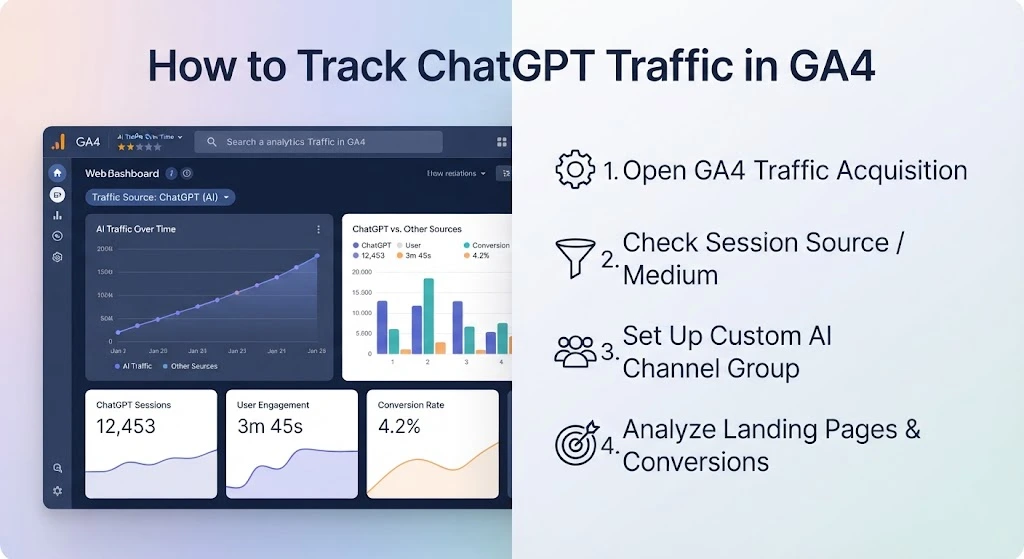
Step 1: Open the Traffic Acquisition Report
Log in to GA4, select your website property, and open Reports → Acquisition → Traffic acquisition.
This report helps you understand where sessions originate. Google distinguishes Traffic acquisition, which uses session-scoped traffic-source dimensions, from User acquisition, which focuses on how users first arrived.
Read Google’s official Traffic acquisition report instructions.
Step 2: Look for ChatGPT Referrals
In the report table, change the primary dimension to Session source / medium or Session source, depending on the available options.
Search for recognizable source values, including chatgpt.com, chat.openai.com, and other ChatGPT-related entries that actually appear in your property. Also check for sources associated with Perplexity, Gemini, Copilot, and Claude.
Do not assume that every website will display identical source labels. The information passed by the referring platform and recorded by GA4 determines what you can see.
If you find ChatGPT referrals, examine sessions, engaged sessions, engagement rate, key events, and revenue where available. This gives you an initial picture of identifiable ChatGPT traffic and its performance.
Step 3: Identify the Landing Pages
Next, find the pages visitors land on after clicking through from ChatGPT.
You can use a GA4 Exploration or a supported report that combines Landing page + query string with the relevant session-source dimension. Filter for the source values you want to investigate.
This helps answer practical questions. Are visitors landing on tutorials, product pages, comparison articles, pricing pages, or service pages?
A content website might receive AI referrals to detailed guides, while a software company might see visits to feature comparisons. Use your own data to discover which pages matter rather than assuming one page type always performs best.
How to Create an AI Traffic Channel in GA4
If your GA4 property already classifies supported visits under its default AI Assistant channel, you may not need a custom channel for basic reporting. Check the channel values first.
A custom channel is useful when you want a more specific grouping, a dedicated reporting category, or a controlled list of AI sources.
Step 1: Create a Custom Channel Group
Open Admin → Data display → Channel groups. Copy an existing channel group, then add a channel called AI Referral Traffic or AI Assistants.
Google explains the full process, including supported conditions and how channel ordering works, in its official custom channel groups documentation.
Step 2: Use a Domain-Based Regex
Rather than relying on broad fragments such as ai or gpt, start with known domains that you have confirmed in your own GA4 source data.
For example:
(^|.*\.)?(chatgpt\.com|chat\.openai\.com|perplexity\.ai|gemini\.google\.com|copilot\.microsoft\.com|claude\.ai)$
This expression is intended to match the listed domains and their subdomains. It is a starting point, not a universal list of all AI referral sources.
Before using it, test the expression against the exact values in your GA4 Session source dimension. Remove domains that are not relevant to your report and add verified domains used by platforms you actually receive traffic from.
Why avoid broad matching? A pattern such as .*ai could match unrelated source names. Likewise, .*gpt may match values that have nothing to do with ChatGPT. Narrow matching makes the channel easier to audit.
Google documents how regular expressions work in Analytics in its regex reference.
Step 3: Check Channel Order and Save
Custom channel groups classify traffic according to the first matching channel. Place your custom AI channel above the generic Referral channel so matching sessions are assigned to the more specific category first.
Save the group, then select it in a supported acquisition report. Confirm that the resulting sessions match the sources you intended to include.
Remember that a custom channel reorganizes recorded traffic. It cannot recover referral information that GA4 never received.
How to Measure ChatGPT Traffic Beyond Sessions
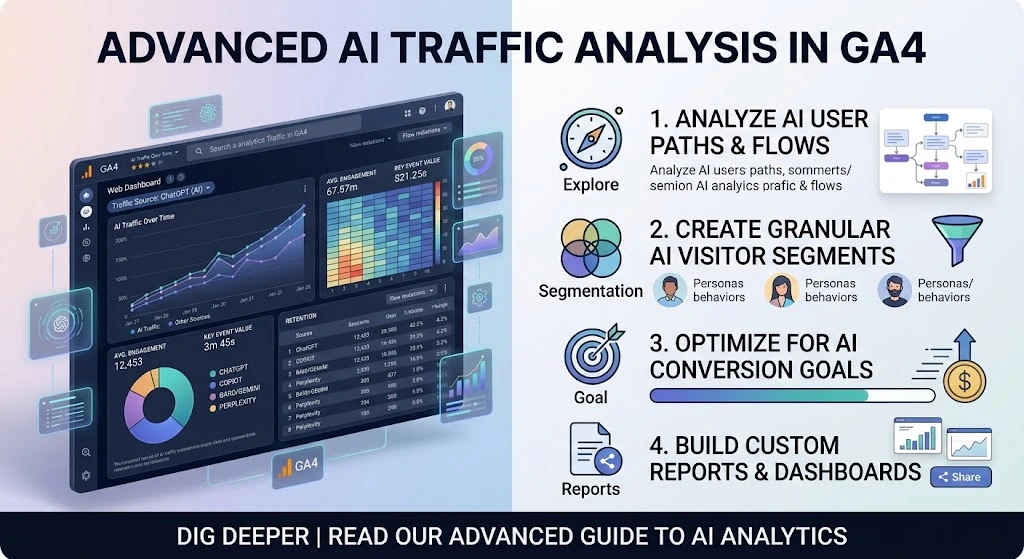
Session volume is useful, but it is only the beginning. A meaningful GA4 AI traffic report should show whether those visits engage with your content and contribute to business goals.
Engagement: Compare engaged sessions, engagement rate, and average engagement time. These metrics help you understand whether visitors interact with your site.
Landing pages: Identify pages attracting the most AI-referred visits. Look for opportunities to improve explanations, internal links, calls to action, and next steps.
Conversions: Review key events such as demo requests, purchases, newsletter sign-ups, or lead-form submissions. Make sure these events are configured correctly before using them to evaluate AI traffic.
Revenue and lead quality: Ecommerce websites can examine purchases and revenue where their tracking is configured. B2B companies may need to connect GA4 data with a CRM to assess qualified leads and closed deals.
Do not assume that ChatGPT visitors always convert better than organic visitors. Compare channels using the same reporting period and conversion definitions. When AI referral volumes are small, a few additional sessions or conversions can cause large percentage changes.
How to Track Perplexity, Gemini, Copilot, and Other AI Traffic
The same approach can help you investigate Perplexity referral traffic, Gemini visits, Microsoft Copilot referrals, and other identifiable AI sources.
Start by reviewing the actual source values recorded in GA4. Add verified domains to your custom channel rules, or use the existing AI Assistant channel where it meets your reporting needs.
For useful comparisons, keep platform-level details available even if you also report a combined AI traffic total. This allows you to compare landing pages, engaged sessions, key events, and revenue by source.
If you want to monitor AI-driven website visits without paid tools, GA4 is a practical starting point. More advanced dashboards can help agencies or larger teams, but you do not need paid software simply to identify recorded referrals.
Why ChatGPT Traffic Is Not Showing in GA4
If ChatGPT traffic is missing from your reports, check these common causes before changing your tracking setup.
Missing referral information: Some AI-influenced visits may arrive without an identifiable source and be classified as direct. GA4 cannot reliably reconstruct a previous discovery journey.
A narrow or incorrect filter: Search your raw Session source values first. Your regex cannot match a source value that it does not account for.
Incorrect channel order: If your custom channel comes after Referral, matching sessions may be classified under the earlier channel. Check the order in your custom group.
The wrong report dimension: Use Traffic acquisition and session-scoped dimensions when investigating the source of a visit. User acquisition answers a different question.
Low identifiable traffic: A website can receive AI citations without generating clicks. No identifiable referral sessions does not prove that your brand never appears in AI answers.
A useful troubleshooting sequence is to confirm the date range, inspect raw sources, test the regex, verify channel order, and review key-event configuration. Change one setting at a time so you can identify the cause.
GA4 vs. AI Visibility Tools: What Should You Track?
GA4 is designed to help you understand visits and on-site activity. It is not a complete AI citation or visibility tracker.
AI visibility platforms may report brand mentions, cited URLs, competitor presence, or responses to selected prompts. Their coverage and measurement methods vary, so review what each tool actually measures before comparing results.
There is also an important difference between tracking your own traffic and estimating competitor traffic. Your GA4 property provides first-party data about your website. You cannot access a competitor’s private GA4 property unless they grant you access.
Third-party tools such as Semrush can estimate competitors’ AI traffic using their own data and methodologies. Those estimates can support directional benchmarking, but they are not verified counts from the competitor’s GA4 account. Treat them as estimates, not directly comparable first-party analytics. See Semrush’s guide to tracking ChatGPT traffic for yourself and competitors.
For another perspective, Bing Webmaster Tools offers an AI Performance report for supported AI experiences. It provides citation insights, including cited-page information, rather than a universal count of ChatGPT visits. Read the Bing Webmaster Tools documentation.
For a fuller view, combine GA4 referral and conversion data with appropriate visibility or citation reporting. Our guide to how to optimize content for AI search explores the visibility side of that equation. Replace this link with the exact URL of the existing guide before publishing.
A Practical AI Referral Traffic Reporting Template
A useful report should be repeatable. Use a spreadsheet or saved report with the following columns.
| Reporting field | What to record |
|---|---|
| Reporting period | Start date and end date |
| AI platform | ChatGPT, Perplexity, Gemini, Copilot, or another verified source |
| Session source / medium | Exact source values recorded by GA4 |
| Landing page | Page path that received the session |
| Sessions | Number of sessions attributed to the source |
| Engaged sessions | Sessions meeting GA4’s engagement criteria |
| Engagement rate | Engaged sessions divided by sessions |
| Key events | Relevant conversions or actions |
| Session key event rate | Percentage of sessions that included a key event, where available |
| Revenue or qualified leads | Business outcomes supported by your tracking |
| Notes | Tracking changes, content updates, or unusual patterns |
For example, your monthly review might reveal that one tutorial attracts the most identifiable ChatGPT sessions but another page generates more demo requests. That is a reason to examine intent, page content, and conversion paths rather than focusing solely on traffic volume.
Calculate conversion rates using consistent definitions and the appropriate GA4 metric. Keep AI citations and mentions in a separate section, with the source and measurement period clearly identified.
Review the report monthly, or more frequently if your traffic volume supports useful comparisons. Record channel-rule changes and major content updates so you can interpret trends in context.
Final Takeaway
Tracking ChatGPT traffic does not need to be complicated. Start with GA4’s Traffic acquisition report and its AI Assistant channel where available. Inspect your source values, use a carefully tested custom channel when needed, and evaluate landing pages, engagement, conversions, and revenue.
Most importantly, keep traffic and visibility separate. GA4 helps you understand identifiable visits and their outcomes. Citation and visibility tools can help you understand how your content appears in AI answers. Using both gives you a more balanced view of AI discovery and its potential business impact.
How to Track ChatGPT Traffic in GA4: Your Next Steps
Start by reviewing your GA4 Traffic acquisition report, identifying ChatGPT referral sources, and checking which landing pages generate meaningful engagement and conversions. Create a custom AI traffic channel if needed, validate your source filters, and monitor performance monthly. Remember that GA4 tracks identifiable visits, not every interaction influenced by AI search. Combine referral analytics with AI visibility monitoring to understand the bigger picture.
Can GA4 track ChatGPT traffic?
Yes. GA4 can report identifiable sessions from ChatGPT. It cannot reliably identify every visit influenced by an AI answer.
Is ChatGPT traffic considered referral traffic?
It may be recorded as referral traffic or grouped into an AI Assistant channel, depending on the source information and GA4 classification. Check the recorded source values in your property.
How do I track ChatGPT traffic for free?
Use the GA4 Traffic acquisition report, inspect Session source / medium, and use the existing AI Assistant channel or create a custom channel if needed.
What regex should I use for AI traffic in GA4?
Start with a domain-based expression matching verified source values in your property. Test it before using it for reporting, and update it when you confirm additional relevant domains.
Why does ChatGPT traffic appear as direct traffic?
Referral information may be missing when a visitor reaches your website. GA4 may classify the session as direct when it cannot identify the referral source.
