

Choosing an AI tool for your business sounds simple until you actually have to make the decision.
There are AI writing tools, research assistants, customer support platforms, AI agents, automation software, analytics tools, coding copilots, meeting assistants, and hundreds of specialized AI applications. Almost every product promises to save time, reduce costs, or transform the way your team works.
But which one is actually right for your business?
The answer is not necessarily the tool with the most features, the biggest brand name, or the most impressive demo. The right AI tool should solve a clearly defined business problem, fit your workflow, protect your data, integrate with your existing systems, deliver reliable results, and create enough measurable value to justify its total cost.
This guide gives you a practical way to do exactly that.
How Do You Choose the Right AI Tool for Your Business?
Start with the business problem, not the technology.
Before searching for the best AI tools for business, answer five basic questions:
- What problem are we trying to solve?
- Who experiences this problem?
- What does the current process cost?
- What should improve after introducing AI?
- How will we measure success?
For example, a company might spend 100 hours every month preparing routine customer responses. The objective should not be “we need an AI chatbot.” The objective could be to reduce preparation time by 40% while keeping a human approval step for every customer-facing response.
That gives you something measurable.
Once you know the desired outcome, you can evaluate AI tools against it rather than being distracted by features you may never use.
1. Define the Use Case Before You Compare AI Tools
A good AI tool evaluation starts with a specific workflow.
Look for repetitive, time-consuming, error-prone, information-heavy, or difficult-to-scale processes.
Common examples include:
- Content creation
- Customer support
- Document analysis
- Research
- Data extraction
- Sales prospecting
- Meeting summaries
- Workflow automation
- Software development
- Marketing personalization
- Internal knowledge management
Then define what success looks like.
It could be:
- 30% less manual work
- Faster response times
- Fewer repetitive tasks
- Higher content output
- Lower processing costs
- Better consistency
- Faster research
- Improved customer service
This is the foundation of effective AI software selection.
2. Use the Simplest AI Solution That Can Solve the Problem
One of the biggest mistakes businesses make is assuming that every AI problem requires a new AI platform or custom system.
It doesn’t.
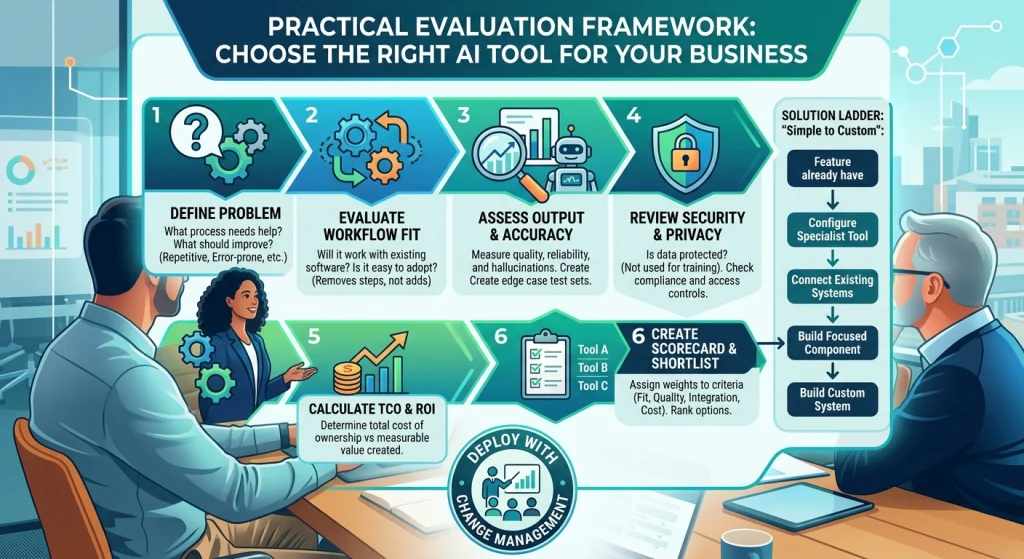
A useful way to approach AI solution evaluation is to move through a solution ladder.
Level 1: Use a feature you already have
Check whether your existing software already includes the capability you need.
Your CRM, office suite, project management platform, CMS, or other business software may already offer AI features.
If it solves the problem adequately, you may not need another subscription.
Level 2: Configure a specialist AI tool
If your existing technology cannot handle the workflow, look for a specialist product designed specifically for the task.
This could be an AI writing platform, transcription service, research assistant, customer support tool, or document-processing application.
Level 3: Connect existing systems
Sometimes the problem is not the AI itself. It is access.
A useful AI tool may already exist, but it cannot access the information or systems required to complete the workflow.
In that case, an integration may be the answer.
This is where tools for AI workflow automation, APIs, Zapier, Make, CRM integrations, and other connectors can become valuable.
Level 4: Build a focused custom component
If existing products almost solve the problem but leave one important gap, consider building only the missing component.
You may need a custom workflow, interface, data connection, or AI-powered function rather than an entire custom AI system.
Level 5: Build a custom AI system
Only consider a broader custom AI solution when the requirement is strategically important, existing solutions cannot meet it, and your business can support the technical and operational responsibility.
This progression helps prevent two expensive mistakes:
Building something simply because you can.
Buying something simply because the demo looked impressive.
3. Should You Buy or Build an AI Solution?
The build vs buy AI decision depends on the problem.
Buying an existing AI tool generally makes more sense when:
- The problem is common.
- A mature product already exists.
- You need results quickly.
- You do not have a dedicated AI development team.
- Ongoing maintenance would be expensive.
Building may make sense when:
- The workflow is genuinely unique.
- Your proprietary data provides important competitive value.
- Existing tools cannot meet a critical requirement.
- You need unusual levels of control.
- The solution is strategically important enough to justify ongoing ownership.
There is also a middle option: integrate and customize existing technology.
That often provides a better balance between speed, flexibility, and cost.
4. Evaluate Workflow Fit, Not Just Features
A tool can have 100 features and still be a poor choice.
Ask:
- Does it fit the way our employees already work?
- Does it remove steps or add them?
- Can employees learn it quickly?
- Can it handle exceptions?
- Does it work with our existing technology?
- Can it support required approvals?
- Does it create additional manual work?
This is especially important for AI business automation.
If employees spend five minutes using an AI tool but another ten minutes correcting, exporting, formatting, and transferring the result, the tool may not actually be saving time.
The best AI solution should improve the complete workflow, not just one part of it.
5. Evaluate AI Output Quality and Accuracy
Traditional software evaluation often focuses on whether a feature works.
AI requires another layer of evaluation:
How good is the output?
Depending on the use case, assess:
- Accuracy
- Relevance
- Consistency
- Completeness
- Response quality
- Citation or source quality
- Hallucination risk
- Formatting
- Editing requirements
- Failure handling
Do not test an AI tool with one easy prompt and call it successful.
Create a representative evaluation set containing:
- Normal cases
- Difficult cases
- Incomplete information
- Conflicting information
- Edge cases
- Cases requiring human approval
- Cases where the correct answer should be “I don’t know”
Then compare the results.
This gives you a much better understanding of AI tool accuracy, AI reliability, and AI output quality.
6. Run a Structured Proof of Concept
For an important business deployment, a proof of concept can be more useful than a sales demonstration.
Shortlist perhaps three to five options and give them the same requirements and test cases.
Measure:
- Accuracy
- Completion rate
- Response time
- Human correction time
- User effort
- Integration performance
- Cost
- Failure rate
A POC should have clear success criteria before it begins.
Otherwise, teams can end up moving forward because everyone simply likes the product.
For enterprise AI implementation, the POC should also involve the people who will actually use, manage, secure, and approve the system.
7. Think About Change Management Before Implementation
Buying AI software is not the same as successfully adopting it.
Employees may resist a new system because they:
- Do not understand why it is being introduced.
- Are worried about job changes.
- Find it difficult to use.
- Do not trust its output.
- Have not been trained.
- Do not know who is responsible for reviewing AI work.
That makes AI implementation a people problem as much as a technology problem.
Before deployment, determine:
- Who owns the tool?
- Who trains users?
- Who reviews AI output?
- Who handles failures?
- Who manages permissions?
- Who monitors usage?
- Who decides whether the tool should continue?
For larger organizations, this should be part of the implementation plan rather than something addressed after launch. Businesses should also evaluate an AI tool beyond its features and pricing by considering reliability, security, privacy, transparency, and potential risks. The NIST AI Risk Management Framework provides a research-based framework for assessing these trustworthiness considerations when designing, deploying, using, or evaluating AI systems.
8. Check Security, Privacy and Compliance
Never evaluate an AI tool only by asking what it can do.
Ask what happens to your data.
Important questions include:
- Is business data used to train models?
- Where is information stored?
- How long is it retained?
- Who can access it?
- Can administrators manage permissions?
- Can data be exported?
- What happens when the contract ends?
- What security controls are available?
- Does the provider meet relevant compliance requirements?
For enterprise AI governance, also consider access controls, auditability, data classification, risk management, and human oversight.
The right AI tool is not merely capable. It needs to be appropriate for the information and risk level involved.
9. Evaluate Integrations and Technical Compatibility
Your AI tool will probably need to work with the rest of your technology stack.
That might include:
- Google Workspace
- Microsoft 365
- Slack
- Notion
- Salesforce
- HubSpot
- WordPress
- GitHub
- Accounting platforms
- Databases
- Internal applications
- Zapier
- Make
Check whether the AI software provides the integrations, APIs, permissions, and compatibility your workflow requires.
An AI platform that works beautifully in isolation may be less useful than a simpler AI tool that fits naturally into your existing systems.
10. Calculate the Total Cost of Ownership
Do not compare AI tools based only on the monthly subscription.
Your AI total cost of ownership may include:
- Subscription fees
- Additional seats
- API usage
- Usage limits
- Implementation
- Integration
- Data preparation
- Training
- Human review
- Maintenance
- Support
- Premium security features
There can also be hidden costs.
If an AI tool produces drafts that require extensive checking, that review time is part of the cost.
If employees need training, that has a cost.
If integrating the platform requires development work, that belongs in the business case too.
11. How Do You Know If an AI Tool Is Worth the Money?
Calculate the likely value before committing.
A simple starting point is:
AI ROI = measurable value created or costs avoided − total AI costs
For example, suppose a process currently consumes 100 employee hours per month.
An AI tool reduces that workload by 40 hours.
If those 40 hours can be redirected to revenue-generating or higher-value work, that creates measurable value.
Now subtract:
- Software costs
- Implementation
- Integration
- Training
- Human review
- Maintenance
That gives you a much more realistic AI cost-benefit analysis.
A cheap AI tool that requires constant correction may have worse ROI than a more expensive tool that reliably completes the task.
12. Compare AI Tools With a Weighted Scorecard
Instead of choosing based on personal preference, create an AI tool scorecard.
For example:
| Criteria | Weight |
| Business and workflow fit | 20% |
| Output quality | 15% |
| Accuracy and reliability | 15% |
| Integration | 10% |
| Security and privacy | 10% |
| Total cost | 10% |
| Ease of use | 5% |
| Scalability | 5% |
| Vendor support | 5% |
| Vendor stability | 5% |
Score every shortlisted AI tool from 1 to 5.
For example, imagine two shortlisted tools:
| Criteria | Weight | Tool A | Tool B |
| Business fit | 20% | 5 | 4 |
| Output quality | 15% | 4 | 5 |
| Accuracy | 15% | 5 | 3 |
| Integration | 10% | 4 | 5 |
| Security | 10% | 4 | 4 |
| Cost | 10% | 5 | 3 |
| Ease of use | 5% | 5 | 4 |
| Scalability | 5% | 4 | 5 |
| Support | 5% | 4 | 4 |
| Vendor stability | 5% | 4 | 5 |
The point is not that the highest mathematical score automatically wins.
The scorecard forces the team to explain the decision.
It also makes AI tool comparison more consistent and reduces the influence of whichever product had the best sales presentation.
13. Ask the AI Vendor the Right Questions
Vendor evaluation becomes especially important for enterprise AI tools.
Before signing a contract, ask:
About data
- Is our data used for model training?
- How is data stored?
- How long is it retained?
- Can we delete it?
About security
- What security controls are available?
- How are users and permissions managed?
- What happens if an account is compromised?
About performance
- What usage limits apply?
- What happens during high demand?
- How is AI performance monitored?
About pricing
- Are there usage-based charges?
- What happens when we exceed our plan?
- Can pricing change during the contract?
About support
- Who provides technical support?
- What service levels apply?
- Is implementation assistance included?
About exit
- Can we export our data?
- Can we export configurations?
- What happens if the product is discontinued?
- How difficult would it be to migrate?
These questions are part of sensible AI vendor due diligence, not unnecessary bureaucracy.
14. Consider Vendor Viability and Exit Planning
A tool can be excellent today and still become a problem later.
Before adopting an AI platform, consider:
- Vendor stability
- Product maturity
- Customer support
- Pricing history
- Product roadmap
- Dependence on another provider
- Data portability
- Contract terms
- Migration difficulty
Think about the end of the relationship before you start it.
A sensible AI exit strategy should answer:
If we stop using this product tomorrow, what happens to our data, workflows, integrations and employees’ work?
The easier the answer, the lower your dependency risk.
15. AI Tools vs AI Agents vs Automation: What Do You Actually Need?
These solutions are related, but they solve different types of problems.
An AI tool may help a person complete a task.
Traditional automation follows predefined rules.
An AI agent can potentially manage a more flexible sequence of tasks toward a goal, depending on its capabilities, permissions and design.
So ask:
Is the workflow predictable?
If yes, automation may be enough.
Does an employee need intelligent assistance with a defined task?
An AI tool may be the better option.
Does the workflow involve multiple steps, decisions and actions?
An AI agent may be worth evaluating.
Do not choose an AI agent simply because it sounds more advanced.
Complexity has a cost.
Choosing the right AI tool also means understanding whether you actually need a traditional AI tool, an automated workflow, or an AI agent. If you’re comparing these approaches, explore our guide on AI workflow vs AI agents to understand which option fits different business processes and use cases.
16. How Should Small Businesses, Startups and Enterprises Evaluate AI?
There is no universal “best AI tool for business.”
The right choice depends on the organization’s needs.
Small businesses
Prioritize:
- Affordable pricing
- Fast implementation
- Ease of use
- Simple integrations
- Minimal training
- Clear ROI
Startups
Focus on:
- Scalability
- Flexible pricing
- APIs
- Integrations
- Automation
- Speed of deployment
Enterprises
Put greater emphasis on:
- Security
- Compliance
- AI governance
- Permissions
- Auditability
- Vendor viability
- Procurement
- Data controls
- Enterprise support
Agencies
Look closely at:
- Multi-user workflows
- Client-data separation
- Collaboration
- Usage limits
- Reporting
- Integrations
- Scalability
This is why a list of the best AI tools for small business cannot automatically be treated as a list of the best AI tools for an enterprise.
17. When Should a Business Avoid AI?
This question is often missing from AI buying guides, but it matters.
You may not need a new AI solution if:
- The problem happens rarely.
- Existing software already solves it.
- The process is faster manually.
- The cost of implementation exceeds the likely benefit.
- There is no reliable data.
- AI errors would create unacceptable risk.
- Employees would spend more time correcting the output.
- The expected ROI is too low.
Sometimes the best AI investment decision is not to purchase anything.
That is not a failure of AI strategy. It is good technology selection.
18. Use This AI Tool Decision Path
When you are unsure what to choose, follow this sequence:
Business problem → desired outcome → existing software → specialist AI tool → integration → focused customization → custom system
At every stage, ask:
Does this solution meet the requirements at an acceptable cost and risk?
If yes, stop.
You do not need to keep moving toward a more complicated solution.
If no, move to the next level.
This prevents businesses from jumping directly from “we have a workflow problem” to “let’s build an AI platform.”
19. What Does a Good AI Tool Evaluation Actually Look Like?
By the end of the process, your recommendation should fit on a page.
Include:
Problem: What are we solving?
Goal: What should improve?
Options: Which AI tools or approaches were considered?
Evaluation: How did each perform?
Score: Which solution ranked highest against the agreed criteria?
Cost: What is the realistic total cost?
ROI: What measurable value could it create?
Risk: What could go wrong?
Security: How will business data be protected?
Implementation: Who will deploy and manage it?
Adoption: How will employees be trained?
Vendor: Is the provider reliable enough?
Exit: What happens if we stop using it?
Recommendation: What should the business do next?
That is a far more defensible decision than choosing a tool because its homepage looked impressive.
AI Tool Evaluation Checklist
Before choosing an AI tool, make sure you can answer yes to the important questions:
- Does it solve a clearly defined business problem?
- Does it fit the existing workflow?
- Is the output accurate enough?
- Can important outputs be verified?
- Have you tested difficult and edge cases?
- Does it handle hallucination risk appropriately?
- Can it access the required information?
- Is business data protected?
- Does it integrate with existing systems?
- Have you calculated total cost of ownership?
- Is the expected ROI reasonable?
- Can employees actually use it?
- Can it scale with the business?
- Is the vendor stable?
- Have you checked contract and pricing terms?
- Can you export your data?
- Do you have an implementation owner?
- Do employees have an adoption and training plan?
- Have you considered an exit strategy?
- Have you considered whether you need AI at all?
If several answers are “no,” the decision probably needs more work.
Final Takeaway
Choosing the right AI tool for your business is not about finding the most powerful technology.
It is about finding the right level of technology for the problem.
Start with the workflow. Define the outcome. Check what you already have. Evaluate specialist tools before considering customization. Test real work rather than polished demonstrations. Measure output quality, accuracy, reliability, security and integration. Calculate the total cost and potential ROI. Score shortlisted options against the same criteria. Then consider implementation, employee adoption, vendor viability, procurement requirements and your exit strategy.
For larger organizations, that evaluation should also include governance, security, compliance, change management and clear ownership.
For smaller businesses, simplicity and time to value may matter more.
And if an existing feature already solves the problem, use it.
If a specialist tool solves it better, buy it.
If the right tool exists but cannot connect to your workflow, integrate it.
If one important capability is missing, customize that component.
Only build a broader custom AI system when the business case genuinely supports the additional complexity.
The smartest AI strategy is not the one with the most AI.
It is the one where every AI investment has a clear problem, measurable value, appropriate risk, accountable ownership and a sensible way out if the solution stops making sense.
1. How do I choose the right AI tool for my business?
Define your business need, compare workflow fit, accuracy, security, integrations, cost, ROI, and vendor reliability before choosing.
2. What should I consider when evaluating an AI tool?
Evaluate output quality, ease of use, data privacy, security, integrations, scalability, total cost, and ongoing support.
3. How can I compare two AI tools?
Score both tools against the same weighted criteria based on your business priorities, then test them with real-world use cases.
4. How do I know if an AI tool is worth the cost?
Compare its total cost with measurable gains in productivity, efficiency, revenue, quality, or time savings to estimate its potential ROI.
